Silicon Valley Technology Commentary & Archives · Est. 2006 3,045 Posts · 2006–2026
Showing posts with label ChromeOS (33 posts). Show all posts

January 18, 2018

January 18, 2018 · 4 MIN READ · BY LOUIS GRAY

With Web at the Core, Chromebook Options are Strong, Plentiful

With Web at the Core, Chromebook Options are Strong, Plentiful

This looks like an ad. But it's just a few recent Chromebooks.

In 2011, on my first day at Google, I was asked to pick out a laptop. The choices were slim - a thin Apple MacBook Air or the larger MacBook Pro, a forgettable Windows equivalent, or a Linux device more suitable for engineers. While I had the company's first foray into Chromebooks, the CR-48, at home, in addition to my own personal Mac, picking a Chromebook wasn't even an option. The Web-centric OS, which focused on keeping all data in the cloud, and leveraging Web apps, wasn't ready for my every day use.

A few months later, I ran into then SVP of Chrome Sundar Pichai, in the office stairwell as we were on to our respective meetings. Pointing to my MacBook Air, I told him I couldn't wait to turn it in and go completely ChromeOS at home and at the office. In his usual humble and understated way, he said the team was working on it, and to stay tuned. Not too long afterward, in another unplanned hallway conversation, he introduced me to a VP on his team developing hardware, and offered me up as a willing beta candidate.

The 2013 Chromebook Pixel (version 1)
I didn't think much of the choice encounter until early 2013, when I saw Sundar take the stage and unveil the Chromebook Pixel, a high-end Chromebook with a touchscreen, and promised faster speeds and memory.

As I recounted a few years ago on Google+, I saw Sundar as available on IM shortly after the event and congratulated him on the exciting launch. His IM came moments later... "Do you have one yet?" Surprised, I said I didn't, and it was no big deal. I had no such illusions of self-importance. But he answered directly, "I'm so sorry. You were supposed to be on the list." Fast forward, less than an hour later, I had a brand-new Pixel - and I haven't seen a need to use a Mac since.

That a Googler is using a Chromebook isn't newsworthy, obviously. Water is wet. But I remember a time when betting on a Web-centric device like a Chromebook was a real leap of faith. There were always excuses not to make the switch, be it a specific piece of software, some concern about printing, or general distrust of the unknown. Maybe we were worried about moving local storage to the cloud, or editing photos, or losing access to some premium software on Mac or Windows we'd already paid for - often at a cost even higher than a new machine.

Chromebooks have proven exceptionally popular in schools, thanks to their versatility and low cost. And as people become more mobile-centric, their data also becomes more portable and Web centric. Just as you expect to have your data follow you from phone to phone, moving from device to device should be seamless. Like I'd said in 2012, the future of local storage is practically none at all.

This summer, I got my wife a touchscreen convertible Chromebook for less than $100.

Watching the many different options for Chromebook hit the markets feels a lot like the same momentum we saw when Android's many partners took imaginative approaches to new handsets. While we essentially knew the rigid details coming from Cupertino for both computers and phones, Google partners built big and small and with any number of differences to set each apart, from brands as diverse as Acer, Asus, Dell, HP, Lenovo, Samsung and Toshiba.

Now the decision process is one of plenty, not scarcity. So many options, pretty much all of them good. You can get small screens or big screens. You can get touchscreens and convertibles that act like a tablet. You can run Android apps, or even mark up the screen with a digital pen. All very cool.

This summer, while on a family vacation in Chicago, after seeing so many positive reviews for Samsung's Chromebook Pro, I figured it was time for an upgrade from my two year old Acer 710. I quickly bought one on Amazon, had it delivered to an Amazon Locker down the street the next day, and after entering my Google credentials, I had made an incredible upgrade, with no data migration needed. It was almost too easy. (And yes, that's the laptop I'm on now)

Having seen the Pixelbook, the successor to that 2013 Pixel and its 2015 follow-on, and even more good reviews, I'm already getting that itchy feeling and have added the newest device to my shopping cart more than half a dozen times, desperately wanting it, but knowing the Chromebook Pro has a long life left.

Meanwhile, my wife's slim Asus Chromebook I picked up this July gets constant use, and my 9 year old twins bang away on inexpensive Acers to do work in Google Docs. They do the work of machines that cost 10 times as much, without coming bundled with the worry that you lose your data in the event of a disk failure. And the gaps that may once have been there in 2010, 2011 or 2012... they're gone.

If you're an elite creative software wizard who has a custom setup, then keep it up, but for the rest of us who use our devices to create, engage, consume and share, the Web is the most powerful device there is, and Chromebooks were designed for it. They've come a long way.

Disclosures: I work at Google. You knew that. But I still pay for my Chromebooks, except for those provided for me to use at work, obviously.

October 13, 2014

October 13, 2014 · 3 MIN READ · BY LOUIS GRAY

Cloud Powered Near Instant PC, Mobile Upgrades Are the New Reality

Cloud Powered Near Instant PC, Mobile Upgrades Are the New Reality

Buying a new computer or getting a new phone used to be a huge pain. Even if everything was up and running right away, you had to plan for hours, or even days, of moving all your data from the old device to the new one. And if you didn’t successfully complete the data migration, or had sufficient paranoia, you could end up with old devices cluttering your home - just in case you might need to get that old content. But with so much of our data moving from local disks to the cloud, and new operating systems improving their sync and account setup, the day of hot swapping devices is here.

As you know, for the past few years, our home has been a ChromeOS and Android family. This started well before I joined Google, and as each OS gets smarter, that move looks to have been the right one - especially when it comes to this issue.

Samsung's 2012 Chromebook Got Bumped for the 2014 HP.


Last week, thanks to a sale on Woot.com, I purchased a new HP 14 inch Chromebook for my wife. One evening, as she was using the 2012-era 11 inch Samsung Chromebook, I told her to close her eyes. I took her old laptop and put the new one in her lap, and when she signed in, she didn’t miss a beat. All her bookmarks were there, even down to the tabs she had open in her browser. With one move, and for the same $200 or so I spent two years ago, she got a faster device, double the RAM, and a larger, more vibrant screen, with no headaches around data.

There was no question of whether she had to back up photos, or copy her songs. No dragging and dropping off folders and documents. It just worked, exactly as I had expected it to. And the next morning, when she had to print to our networked printer, she just told the browser to print, and the printer was listening. No printer drivers, and not even a memory of a CD-Rom or DVD. It just worked.


Meanwhile, on mobile, the story is much the same. Whether it’s due to an accidental drop (which has happened in our home more than once), or a required factory reset thanks to trying new software before it’s ready (that’s also happened), starting over with a new phone or starting the phone over from scratch is no big deal any more either. Signing into my account brings my account information, access to my data, my apps, and my preferences.

In the storage industry, we used to talk about hot swappable units - which would enable upgrades without reboots or interruption of access to data. The dream of upgrading servers, disks, arrays or network equipment without downtime was rarely achieved, but often talked about. On the consumer side, many of us have grown accustomed to the inevitable pains that come with getting new devices or even upgrading those devices from one system version to the next, and it doesn’t have to be this way any more.

Standard Disclosures: I work at Google, the company behind ChromeOS, Android, and great tools that help you sync your content between devices. You can assume I prefer cloud-based data.

January 31, 2014

January 31, 2014 · 4 MIN READ · BY LOUIS GRAY

In Tech, In Order for X to Win, Y Doesn't Have to Lose

In Tech, In Order for X to Win, Y Doesn't Have to Lose


While it's somewhat hard to imagine now, with Apple seeing incredible success, it was less than two decades ago when the company, facing a small market share, and minuscule developer interest, had to pull a rabbit out of its hat to ensure longtime survival. That surprise came from an unexpected partner - longtime nemesis Microsoft, who in 1997, not only gave the then-beleaguered company a much-needed cash injection of $150 million, but also promised continued updates to the then-essential Microsoft Office suite, required to keep Macintosh's hopes alive as a viable platform.

Amid the shocked faithful, who responded with boos over making Internet Explorer the default browser for the Macintosh, instead of the arguably more Mac-like Netscape Navigator, CEO Steve Jobs said the unforgettable phrase easy to forget in an environment where it's commonplace to pit technologies against one another:
“If we want to move forward, and see Apple healthy and prospering again, we have to let go of a few things here. We have to let go of this notion that for Apple to win, Microsoft has to lose.” (Source: YouTube)
Turns out, as with many things, he was right. Microsoft, despite the company's many challenges, still is worth more than $300 billion, and saw income of more than $16 billion in the most recent quarter. When it comes to operating system choices, usually one picks Macintosh or Windows (and not both), or mobile OS choices, one could pick iOS or Windows phone (and not both), but both companies have managed to have significant places in the tech world for the last two decades.

Rarely does the winner take all.
Fast forward from Steve's words in Boston in 1997 to today - a world where big companies like Google, Apple, Microsoft, Amazon, Facebook and others command significant visibility and influence - but comparably younger companies like Twitter, Dropbox, Tesla, Nest (pre-acquisiton), Uber and others manage to also carve out interesting opportunities and become big companies themselves.

It's often assumed that if one "wins", another has to "lose". If Facebook wins, does Twitter lose? If Android wins, does iOS lose? If Amazon wins, does Google lose?

As a user of these technologies, and someone who watches the market closely or writes about these technologies, I see lines forming - not just of people who prefer one technology or one company relative to another, but of people who also display an equal and opposite reaction, to strongly dislike the company or technologies less preferred.

Those decisions have odd echoes. It's assumed that if you like the iPhone, then you must prefer Apple Mail over Gmail. If you like Windows Phone, you must also prefer Bing search to Google search. And if you have a blog that covers the minutiae of Apple's comings and goings, that documenting any negative opinion about their perceived competition should be highlighted with equal or higher volume.

Simply stated: I disagree, and think we can do better. You can like one company's vision or products even if you purchase from another one. It can be possible that all the major players find a space where they are successful. And the best products are built when it's the users' values that are at the forefront, rather than a false battle started to strengthen the position against another player.

Larry Page, Google's CEO, addressed this point at Google I/O last summer, when he said:
"Every story I read about Google is 'us vs some other company' or some stupid thing, and I just don’t find that very interesting. We should be building great things that don’t exist. Being negative isn’t how we make progress. Most important things are not zero sum, there is a lot of opportunity out there."
Recently, The Verge wrote a great in-depth piece about being a fanboy, asking "Have you ever loved something so much it hurt?" showcasing a number of examples of people so consumed about making sure people knew which side of these battles they were on that they were unforgiving in their tone with anyone else who disagreed. I believe you can have a strong preference, and can evangelize a product or platform, like I do often with those I enjoy, without having to cut down alternatives or those who've selected a different way.

The world is a very large place. There are many millions of people who haven't yet purchased smartphones, tablets or PCs, let alone decided on their favorite OS or apps. There is room for many small companies and big companies alike to innovate and do incredible things. There's room for us all to intellectually choose to be fair and review each new product on its merits and stand for those things we believe and like without needing to tear down alternatives. It might be fun, but we can do better.

Disclosures for transparency's sake: I work at Google, which makes some of my personal favorite products, like Android, Gmail and ChromeOS. It can be assumed Google occasionally competes with other market participants like Apple, Facebook, and Microsoft.

(Images via Dreamstime, which is an excellent resource)

January 21, 2014

January 21, 2014 · 4 MIN READ · BY LOUIS GRAY

Either you are in Engineering, or you are in Sales.

Either you are in Engineering, or you are in Sales.


At BlueArc, our longtime CEO and executive chairman Gianluca Rattazzi had a saying which he often weaved into his presentations at our company all-hands meetings. "Either you are in engineering, or you are in sales."

The idea was to have employees from all corners of the company take ownership of our shared revenue goals, or think about what each of us could do, whether we were in Marketing, HR, Finance or Support, to encourage us to meet our number. Even if we weren't dialing for dollars or meeting with customers, if we weren't the people actually building the product ourselves, we had to think like salespeople. It also was aimed to reduce conflict between teams, as we wouldn't shake our heads at the antics of account managers, or point fingers when one territory or account proved harder than expected.

Meanwhile, engineers have to keep being focused on what they do best, which is design and deliver incredible products. Most engineers, as Dilbert often points out, make terrible sales people. They would likely rush to tell you the product's latest flaw or highlight the bug list of the week instead of working to find a way to make the current offering fit your needs - which would delay or block the sales cycle.

As I see it, product managers are the buffer between engineers and marketing. Marketing is the buffer between product management and the real world (aka the customers and press). Between those two hops, code turns into features, and features turn into benefits. If lucky, those benefits can turn into revenue, and as most companies tell you, revenue solves all problems.

Which brings us back to the split - either you are in engineering, or you are in sales. Even if you don't carry a quota-bearing number, as an employee of a company, you take some amount of pride from the work delivered there. When the company is having a hard time, you have a hard time. When the company is preparing a new product, you are probably eager to try that product, and tell the world about it.

At Google, as I mentioned last November, that process includes early access and beta testing, which we call dogfooding. Many of us are lucky enough to get early access to things like +Google Glass or the Chromebook Pixel. We are more likely to be using a Nexus 5, Nexus 7 or Moto X than the average +Android user, and have a more-encompassing understanding of the company's vision and products than those outside the company.

As an early adopter and technology enthusiast, promoting products I like is second nature. I've been touting ChromeOS for years. I switched to Android well before picking up a Google badge. I always tell people when products I like are fantastic. And that extends to visionary new ideas like Google Glass. I've recently seen some memes on various tech blogs about a perceived dropoff in use by Google employees of this early version of the product - saying the product should be so fantastic that people clamor to use it, and trying to read the tea leaves into saying the product won't succeed - a curious proposition considering it hasn't even launched yet beyond a small circle of Glass Explorers.

My Kids, Racing #throughglass

Without diving too deep into those weeds, I can say I do use it, and I find having a first-person view for recording video and taking photos incredibly valuable. I get instant notifications of email and texts and can respond by voice, hands-free. And wherever I go while wearing Glass, the questions are from excited people who are delighted to see how simple it is to use, not to mention how it non-intrusively lets me continue a conversation, while making eye contact, with the small viewer being out of the way. I take Glass with me on walks to the park with my kids. I took Glass with me to the +San Francisco Zoo on Monday. It becomes another lightweight way to capture the experience.

A View of My Wife and Twins #throughglass

If you're inclined to be skeptical, and that sounds like sales, that brings us back to the original thought - as an employee of a company that makes things, you represent the product. You can help others see how a product can be used, and if you're spotted using the competitor's phone or OS, or you prefer a competitive service or platform, people see that. That's part of why Steve Ballmer's kids weren't even allowed to have iPods and Bill Gates' kids used MSN search instead of Google. Those kids didn't work for Microsoft, but by extension, it would be a fairly bad case study to see them using competitive products.

The good news is I don't believe I'm at a place where I'm asked to use low-quality products like the Zune and MSN Search. It's easy to get excited about products that are making it easier to get information and share updates more quickly, or to get to my data no matter where I am, from any device. I can't go back twenty years and become an engineer, taking all the required computer science courses needed to be the true alpha geek, but I know I can do my part to improve the product from the inside, and tell the world about it on the outside. Think about yourself in your role. If you're not in engineering, aren't you in sales?

Disclosures: I work for Google, obviously. I often get to dogfood our products, like Glass, the Chromebook Pixel and others, free of charge. I paid retail price for my Nexus 5 and Nexus 7, and prefer Android to alternatives. If I forgot a disclosure, I should disclose that too.

November 5, 2013

November 5, 2013 · 5 MIN READ · BY LOUIS GRAY

Enthusiasts & Evangelists: Pushing Product, Begging for Features

Enthusiasts & Evangelists: Pushing Product, Begging for Features

There's a fine line separating an enthusiastic user from that of an evangelist, even if the two terms are often thrown out there as equals. For as excited as a user may be about consuming your product or your ideas, it takes an extra level of effort - working as a partner, testing early versions of products, and seeing where a product is headed to be truly considered an evangelist. An enthusiast is typically on the receiving end, a consumer of the benefits, while the evangelist not only takes in the benefit of your work, but can help accelerate it.

Evangelists are often early adopters of your product, who have been converted to your story and ideas, and are willing to advocate on your behalf. Some of the top consumer-facing companies have turned to evangelists in house, and their fingerprints are all over the successful growth of their customer base, and regularity by which their products are seen in the press, while others rely on end-user evanglists to bring the story to new communities.

Enthusiasts, while excited about your product, are likely to be found breathlessly awaiting morsels of information, be they rumor or news. They may have their fingers on the buy button and refresh your product pages as they get ready to buy, and make cash available. They debate your benefits and beg for feature enhancements, but if their demands aren't met, they'll just as soon as wait for the next one, debate amongst their peers where you went wrong, and suggest why it just might be high time to switch to a competitor. Enthusiasts are never employees of the company, though they may be close to the teams, be courted in user groups and given early access to items to provide beta stage feedback.

Some of the Best Evangelists I Know

The most well known evangelist in Silicon Valley lore is very likely +Guy Kawasaki, who while at Apple in the early Mac days, fought to bring the Macintosh story to developers, schools and customers everywhere. Guy's moved on to promote other products, including +Motorola Mobility, but his Apple legacy remains intact. More recently, the work done by Shak Khan for Spotify and +Thomas Meyer of Sonos put both those products on the map for me. In both cases, Shak and Thomas delivered a 1:1 relationship with me as an early adopter, providing access to products, trading feedback on improvements, and finding ways to get their services in the hands of new users.

The ideal scenario is one telling many who tell more.

The best evangelists can help to convert enthusiasts into evangelists. As discussed in depth as the first stage of early adopter behavior, the enthusiast can graduate from being a consumer of your work, and instead works as an unpaid advocate for your story and your ideas - accelerating the network effect. As the 1:1 relationship at the initial touchpoint cannot scale past several dozen or even hundreds of top-tier influencers, one must hope that they evangelize on your behalf why your product is better, why you can be trusted to keep coming up with exciting new innovations, or, if you're behind in a certain area, why you can be counted on to bridge those gaps.

Seeing Potential Instead of Problems

An evangelist can believe strongly in a direction for a product and buy in early - in the same way as an investor can see potential a company and buy its stock. In 2010, my move to Android from iPhone was done at a time when the case could pretty easily be made that iOS' user experience was better and the list of applications available was longer. The debate as to which installed base was larger was also up for question. But I could see the trajectory, and, as I was later proven correct, the applications caught up, the user growth accelerated, and in the minds of many, the user experience is equal, or at least arguable. Even from a point of perceived weakness, I believed strongly that their choices as a platform were right.

The same could be said for Spotify's early trial back in 2009. While iTunes was the big fish in the pond, Spotify changed the game for me almost overnight - and every online music service has followed their model, even if the product hadn't yet officially shipped in the US, and there were occ

Crossing the chasm from enthusiast to evangelist is a lot like moving from a hobby to a religion. It's one thing to dabble, and quite another to commit. It's no surprise then, that evangelists are most commonly associated with religious institutions and converting people to the one true way.

Like a good religious person, one publicly glosses over the challenging parts, promising only purity and bliss. For example, in a 2007 post I wrote for +GigaOM, I highlighted "five lesser-known tips for being an Apple fanboy". The number one rule? "Never admit fault with Apple around non-Mac people." Giving the perceived opposition a weapon to use against you was never a good idea. It was better to suffer in silence, or quietly find a peer to help you with your issue than to growse publicly. The same goes for the converted evangelist. It is better to report product issues back to the company or their rep, or a fellow user than to complain publicly. Obviously enthusiasts have no such shackles - as they're all too eager to break apart your product and tell the world where you've done wrong.

My father raised me to believe that bad news travels much more quickly than good news. A person with a bad experience will tell seven people, and a person with a good experience will tell three. That requires a higher percentage of positive interactions, and to make this success repeatable. But while an enthusiast will share the good news and the bad news at equal volume, an evangelist will simply amplify the good news, and constantly work in the background to solve the bad stories. It's not blindness, but discretion.

Especially in the fickle world of consumer marketing and outreach, you need to find evangelists, who will find you enthusiasts. If your product can't convert people to share your story, your story probably isn't that good. Your service has to be that much better that an early adopter or evangelist will take that bet and invest their time and effort to tell your story - like I did with FriendFeed and Google Reader years ago, later Spotify and Sonos, and now with great stories like ChromeOS - which I strongly believe presents the platform of the future. People like Shak and Guy and Thomas are rarities, but they can be the accelerant that moves your flame to an inferno.

Usual Disclosures: I work at Google. Google is the proud owner of Android and ChromeOS, of course. We also make Google Play Music All Access, an assumed competitor to Spotify. Any bias is my own and I'm not speaking on behalf of Google at the moment.

October 1, 2013

October 1, 2013 · 5 MIN READ · BY LOUIS GRAY

Developing for the Web or for Classic Mode

Developing for the Web or for Classic Mode

Apple's transition away from Mac OS 9 to Mac OS X is more than a decade old at this point, which means an entire generation of computer users may never have been exposed to the "Classic" Mac OS, which launched in 1984 and evolved for the next few decades before being put out to pasture.

I remember, as if it were yesterday, my own delight at hearing the deliveryman knock on the door and leaving behind a package which contained a retail box with Mac OS X 1.0 on compact disc, which promised to completely change the way I interacted with my computer, bringing with it a new and modern look, a new kernel and more.

It Looks Great, But What About Printing?

Living on the bleeding edge by installing this first version of Mac OS X meant it had some obvious holes. For one, I couldn't print. For another, I couldn't play any DVDs. So while some of the features were exciting, it was clearly limited. These limitations, and general skittishness over new technology, led many people not to dive into Mac OS X right away - and some software developers, most notably Quark and Adobe, dragged their feet on committing to the new OS, waiting for the market to demand it. In the meantime, we users had to live in a "one foot in, one foot out" experience, with "Classic" applications launching inside of Mac OS X, displaying the traditional Apple menu bar, the traditional Finder and all other bits one would expect from an older Mac.

This awkward time had developers forced to make a choice. Would they create applications solely for OS X, continue on a path of developing for OS 9, or ship both and risk a gap in features? It's, pardon the pun, a classic dilemma of developing for a known and existing market, or preparing something for a future market. In time, Classic faded away, with Steve Jobs famously holding a burial for it at the WorldWide Developers Conference in 2002. All the big vendors, from Adobe to Microsoft, shipped for Mac OS X. Printer drivers eventually came along, as did the ability to run DVDs and do everything Mac OS 9 could.

The Desktop is the New Classic. The Web is the New OS X.

I feel we're at a similar crossroads now in development, at least on the desktop. As a fulltime ChromeOS user, I don't ever install proprietary software outside of my browser - but I also don't feel limited in what it is I can do. I can print, using Google Cloud Print to my Canon printer at home. I can play all my videos on Netflix or Google Play and my music through Spotify or Google Music. I can run all my productivity apps on Google Drive, edit photos in Pixlr and so on. Even at a time when traditional operating systems are the significant market share leader, I think we've reached a point where developers looking to reach the widest numbers of potential users are better off making a product for the Web than they are by picking a desktop platform - and in those very rare cases where I find out an application needs to be downloaded to even run, I'm surprised.

When you fight against the momentum of the Web, you lose. And while this doesn't mean every part of the Earth has ubiquitous high speed broadband - far from it - I do believe we are at an inflection point, like all those Mac developers were 10+ years ago, where one would need to choose between building for the platform that's known or to the platform that's unknown. And just like in the Mac OS X scenario, the Web as a platform may have a few holes, but the Web's modern browsers are becoming stronger and more robust at a pace I'd argue is outstripping improvements in our traditional desktops.
The Pixel is My Machine of Choice and It's All Web.

My Data Follows Me On Every Device.

In 2011, just after I joined Google, I talked about how I used Chrome all day long, and used multiple browsers to separate my business profile and my consumer ID. Since then, I've moved completely to ChromeOS and Chrome has debuted on both Android and iOS, so you can sync your data to practically any smartphone and never miss a step. Working closely with the Chrome Developer Relations team here at Google, I get to see the browser get faster, and become an even more robust platform for creating rich applications, with exceptional video and sound.

By living completely on the Web, as I mentioned last year in my post on the future of storage being none at all, any computer that has Web access is my computer. Hardware is simply a conduit for my access to my data and my preferences. Once I log in to my accounts through the browser, I should be able to pick up right where I left off, and I shouldn't be limited based on whatever client software or plugins may or may not be installed on this machine.

Pick the Platform for the Future.

Hindsight is 20/20, of course, and we have the benefit of history to fall back on, which clearly shows developers were right to present a fast track for migration away from the creaky OS 9 and start coding for OS X. While Apple's incredible success over the last six-plus years especially has been due to the company's work on iPhones and iPads, had Mac OS X never delivered on its promise, the company would certainly be a shadow of itself. The direction to a more modern OS proved to be the right one.

Now, again, we have a choice - to a more modern platform with more opportunity for a rapidly-evolving set of users for whom the Web and anytime access are a given, and for whom nearly all their time is spent in the browser. Making the leap as a developer to a lesser-known path may involve some risk, but unlike that time at the beginning of the last decade, you don't need the overwhelming majority of a small market base to upgrade and get to your product. Most of those online are already there - and they want your app.

Usual Disclosures: Yes, I work for Google. I work in Developer Relations and think about this stuff a lot. It doesn't mean I have any bias for or against any of our real or assumed competitors.

January 6, 2013

January 6, 2013 · 1 MIN READ · BY LOUIS GRAY

Slashdot Readers Suggest Chromebook Over Tablet

Slashdot Readers Suggest Chromebook Over Tablet


The geek forum +Slashdot has an "Ask Slashdot" feature, where you can ask the community recommendations on tech. I ran into a question from yesterday where the author asks for help in replacing his mother's dead desktop, 2,500 miles away. The nut question - is a tablet good enough?
http://ask.slashdot.org/story/13/01/05/1938232/ask-slashdot-using-a-tablet-as-a-sole-computing-device

The answers throughout the post may surprise most, but not me...
Chromebook: http://www.google.com/chromebook

December 18, 2012

December 18, 2012 · 1 MIN READ · BY LOUIS GRAY

I Sold 5 Chromebooks in 10 minutes at Best Buy

I Sold 5 Chromebooks in 10 minutes at Best Buy


Pro tip: Can't find one of the cool Samsung or Acer Chromebooks for sale in time for the holidays? Here's one solution... head to BestBuy.com, and search for Chromebooks in your area. If a store near you has them on display, go forth and get one (or more), even if you have to drive a bit. Here's a shortcut: http://goo.gl/oRGFi

I went in to get a few for Christmas, and ran into people who were amazed at what the Chromebook could do for such a low price. Fun to see what a quick demo of +Gmail, Google+ Hangouts (thanks +Erica Joy!) and +Google Drive could do. Needless to say, there are going to be some under the trees of my family this year.

/via My Google+ Profile.

September 19, 2012

September 19, 2012 · 7 MIN READ · BY LOUIS GRAY

The Future of Local Storage Is Practically None At All

The Future of Local Storage Is Practically None At All


Stand Back or Your Hard Drive Is Going to Get It

First they came for our floppy drives. Then, they came for our CDs and our DVD drives. It won't be too long until the concept of a hard drive, or any local storage, beyond that needed for temporary offline use, is itself antiquated. After decades of dramatically increasing PC hard disks, from megabytes to terabytes, saving local data is more likely to put you at risk of loss, relative to remote backup, than it is to keep your data safe, helped along by many trends pushing toward cloud storage and applications.

In April of last year, I talked about how I planned to forego the purchase of physical media, disavowing books, CDs, DVDs and other printed materials, when digital would do, and I haven't looked back - getting to my media from any device that recognized my signed-in identity. Meanwhile, as chronicled, starting in early 2010, when I first got a MacBook Air, and accelerated as I've turned toward ChromeOS as my primary device, I have almost entirely stopped the use of desktop applications. If it can't be reached via web browser, it's probably not worth having.

Goodbye Desktop Applications. Your Time Is Past


May's introduction of the latest Samsung Chromebooks (see my review) left me using my Mac only once per day, for a specific task - synchronizing my FitBit. Until recently, FitBit didn't have a completely cloud-capable service, so each night around midnight, after a full day's neglect, I open the Mac, sync the FitBit in the cradle, confirm the data's gone through, and close the Mac again, until the next day. With the recently announced FitBit One series promising wireless syncing to iOS or Android, I'm just one device away from being done.

For the rest of the day, without exception, I am on my Chromebook, or my Android devices. All my music, emails, photos, documents and other web services can be accessed and managed on the cloud through the browser.

Knocking Down Lagging Apps One By One

The evolution of software and its intersection with platforms is an intriguing one. We Mac users in the 1990s and early 2000s occasionally had to make sacrifices, not having access to apps available only on Windows. Similarly, as iOS and Android increased in market presence, there was the occasional app missing from one platform or the other. But over time, practically all applications, or their equivalents, make their way to the top platforms, and while my move to Android more than two years ago came with some apps missing, all the ones I needed quickly followed me there.

No Seriously, Have You Seen Pixlr on the Web? It's Great.

Now the web itself has proven capable enough for almost any task, and reasons why not to go all Web are dramatically reduced, especially the improved capabilities of documents, spreadsheets and presentations in Google Drive, the release of high quality image editing software like Pixlr, and promises that popular desktop applications like Spotify are set to reach the cloud very soon now, to stream music in addition that which you can purchase from Google Play.

Time to Move on From the Desktop and File Mentality

With solid reasons to not go all Web rapidly eliminated, this evolution also brings up the opportunity to revisit old paradigms we've always taken for granted, as how we use our computers and mobile devices has changed.

Consider, for example, the desktop and files metaphor. Decades ago, we adapted our PCs to be similar to those environments we knew offline. The desktop, folders and files all hearken back to this original model. Even the hyperlinks of today's Web follow similar structures with directories and files owned by top level domains, and today's leading cloud storage vendors, including Dropbox and Google Drive, mimic a traditional desktop environment to bring ease of adoption to users migrating from local storage. But this shouldn't always be the case.

While clean directory structures once were enough for me to almost quit a job over a decade-plus ago, machine-generated links to content are good enough, and it's possible we just need to know how content relates to one another, or what you're searching - for example, email, and tags that generate metadata, providing you with what you need even if you don't know exactly where to look.

All Your Computers Are Mine. Seriously.

The notion of this being "my laptop" or "your PC" doesn't even make sense any more if you think about it. All I need is access to my "stuff", and that stuff is tagged to my identity, be it one that is affiliated with Apple, Google, Microsoft, Facebook or any other provider. While Chromebooks have made it most clear that you can sign out of one account and sign in as another and retain access to all your things, the truth is that so long as you are using a leading provider of identity, you should be able to get to all your files, bookmarks, and media from any device with a modern browser. Go ahead, steal my laptop. I'll just get another one that will do the same things and be up and running in minutes.

Kids These Days... They Don't Need Hard Drives

Consider also that my children should never need to use or know about local storage. At ages 4 and 2, my children will enter elementary school in 1 to 3 years. They have been raised with web-connected TVs, tablets and smartphones, have an expectation of anytime access to data, and shouldn't be trained to store data that is tied to any single device. To them, every device has Netflix. To them, every device can get to Google, and anything they want to see, hear or watch can be found by asking Google for the right image or video, instantly - no buffering allowed.

Just two to three years is enough for us to see how rapidly USB thumb drives went from being the hot tradeshow giveaway to now seeming almost completely useless, with online sharing being the norm. Just two to three years was all I needed as a student attending Berkeley in the late 1990s to move from carting a floppy disk across campus to the computer lab for printing my freshman year, to instead email the document to myself as an attachment my junior year.

Oh. So You Don't Have Pervasive High Speed Wireless?

It's easy to sit in Silicon Valley's ivory tower and say that with pervasive high speed Internet, eliminating any dependency on local storage is a brilliant idea. It's easy to overlook potential power outages, cloud disruptions, dependence on third party services, and spotty web. Nobody likes being out of range for phone calls, let alone all your data, and nobody truly wants to be helpless if their account is compromised. Those are not minor and trivial concerns. But neither is ensuring data compatibility as the data is stored on multiple local machines, and backed up to temporary local storage which may or may not be less reliable than a service provider that serves millions or more.

Years ago, it may have seemed silly to move to web-based email instead of desktop applications, and the same could be said for other apps that have now become default on the web - including calendaring, address books, event planning and more. Digital media for entertainment, once the province of physical media delivered to your home or picked up at a retailer, is now accessible anywhere on any device. So too will be your photos, music, documents, and more. I even moved all my family's photos off spinning disk on an array of Macs from the last 4 years and put them on Drive.

The key to staying prepared for the next evolution of computing is to be willing to take a leap of faith - knowledge that you don't need desktop devices when a laptop will do, knowledge that you don't need to have DVDs in your living room when Netflix or iTunes have all you need, and that what you've been used to and taught over decades just might not be entirely the same any more.

Disclosures: I work for Google and yes, Google makes many services that provide for cloud storage and computing, as well as those nice Chromebooks, one of which I gained for free earlier this year and am using right now to make this post (as well as all the screenshots and images in the post, edited in Pixlr).

May 29, 2012

May 29, 2012 · 2 MIN READ · BY LOUIS GRAY

Fast, Sleek New Chromebooks Bring OS Worthy Hardware

Fast, Sleek New Chromebooks Bring OS Worthy Hardware

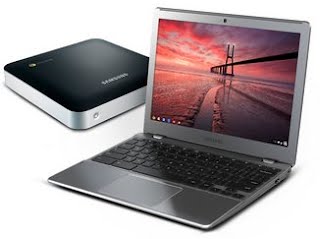
The new Chromebook and a Chromebox to boot.

At the end of 2010, I got my first exposure to a fully cloud-based operating system, when I was an early recipient of Google's CR-48 pilot program. Those of us getting the early gear were guided to be kind to the admittedly clunky hardware, and instead focus on the operating system, which changed the way we thought about local storage. But in addition to the unique OS, which started and ended with the web browser, the machine was intriguing for its long battery life and pervasive wireless capabilities, including 3G connectivity. The second generation hardware, which I obtained from attending Google IO last summer, started where the first gen left off, syncing quickly from my Google account, and bumping up its speed, while maintaining great battery life and wireless.

But in both cases, the devices were my backup devices, secondary to my primary machine, a MacBook Air. Be it specific software, inertia or simple speed and aesthetics, I still found myself using the Apple laptop the majority of the time - except when I was away from home or the office, as the Chromebook has from day one been best for mobile computing. The newest devices, being introduced today, have flipped that argument on its head. I've been using the new Chromebook for the last few days, and the only time I ever got my Macbook out was to sync my Fitbit tracker with its desktop cradle.


Google introduces the new Chromebooks

The new Chromebooks are incredibly sleek, light and fast to boot. That may be hard to substantiate, especially if you assume my pro-Google filter is in effect, so I tested on the WebGL fishtank demo, getting 60 fps at 1,000 fish, lowering to the high 40s if I made that its separate window and kept working on something else, be it Gmail, playing a YouTube video, accessing my docs on Google Drive, or browsing the web.

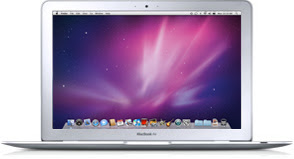
I've been thinking about and working toward a cloud-centric lifestyle for years now, and since joining Google last August, I spend practically all my waking connected hours in Chrome. I have Chrome on my Android phone, on my TVs with the Google TV, on my Mac laptops and, obviously, at the heart of the Chromebook.    The benefits of having access to all my bookmarks, user profiles and content from device to device cannot be overstated, and the newest laptop no longer makes me feel like I am compromising anything in exchange. The hardware is thin, the keyboard and trackpad are top quality, and its weight is light enough that if it were held next to the latest model Macbook Air, any difference is scarcely noticeable. This is no longer just a evolutionary OS story, but one that has hardware worthy of it.

Disclosures (Per Usual): Yes, I work for Google. I have been testing this new unit free of charge. I also previously received the CR-48 and second generation Chromebooks free of charge prior to joining Google, so life is pretty good. :)

August 21, 2011

August 21, 2011 · 1 MIN READ · BY LOUIS GRAY

My MacBook Air Starves of Oxygen

My MacBook Air Starves of Oxygen


In what looks like an ironic coincidence, the day before I jump into new hire orientation at Google, my MacBook Air looks like it is dead. Not just out of power or sluggish or anything... just dead. It gave up in the middle of my reading Google+ and opening a new tab for Google Reader.

I don't want to claim that Uncle Steve heard the news and remotely threw the kill switch or anything, but I am slightly amused at the timing. If that was Jobs' plan, what he doesn't realize is that it's just pushed me to the Chromebook full-time, which is actually a very happy place. I'll give the MacBook Air some more time off and will hope to revive it soon, but with practically all my data in the cloud at this point, all I would lose is whatever didn't get backed up to Time Capsule in the last week or two. The future shouldn't reside on my local hard drive, perilously owned by a single machine's vitality.

My poor Air. So cute. So thin. So inviting. And yet... so antiquated after only two years.

/via My Google+ Profile.

August 9, 2011

August 9, 2011 · 2 MIN READ · BY LOUIS GRAY

Now Playing On Chrome OS Notebooks: Netflix

Now Playing On Chrome OS Notebooks: Netflix

As the Web becomes more capable, running full-fledged services historically requiring dedicated apps, the option of a cloud-centric operating system like Chrome OS makes an increasing amount of sense. The old model of storing all one's data locally on a single hardware device and putting it at risk from damage, theft, or simply corruption or loss as one upgrades from machine to machine seems antiquated when alternatives exist. But there is still, for some, a gap in functionality, as Chrome OS doesn't yet do everything the typical Windows or Mac box does. Until today, one of those gaps was Netflix, the popular movie streaming site that democratically has made its way to practically every screen, from traditional PCs to set top boxes and even game players, like the Nintendo Wii.

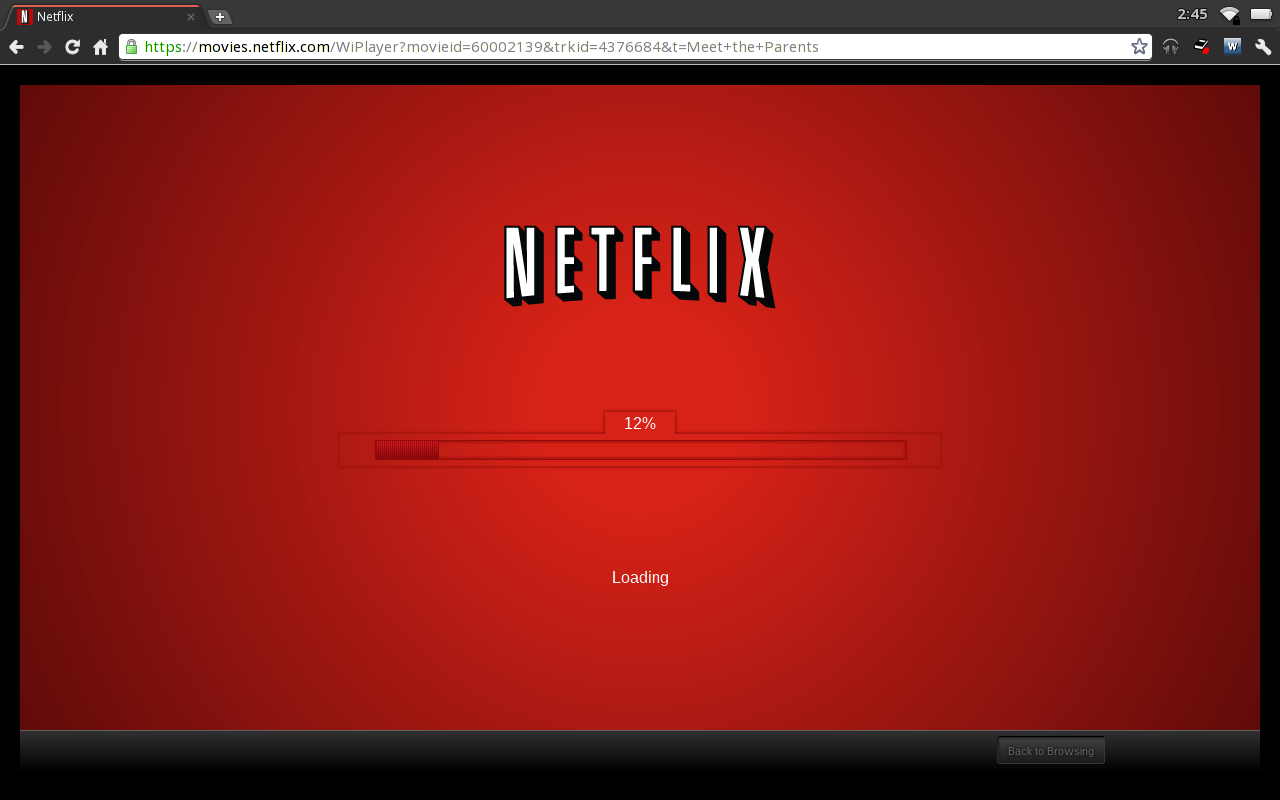
Netflix Loading on My Chromebook for the First Time

Today, Melissa Daniels, community manager for Chrome OS, announced on Google+ that Chrome OS devices from Samsung and Acer now play streaming Netflix films, assuming you are running the latest system update from Google. Without any additional software, you just need your Netflix account and the browser. While this isn't dramatically different from standard browsers on Macs and PCs, it helps fill a perceived gap.

Meet The Parents, streaming from Netflix, on my Chromebook

Without Netflix, I've been renting movies and watching them on YouTube, or from the Android Market, but film studios being what they are, not all titles are in every service at the same time, of course, and Netflix is far and away the leader in the world of Web-based feature film streaming, while Apple holds down its own space with Apple TV and iTunes.

The near-term arrival of Netflix on Chrome has been anticipated for some time, and could be seen with the latest release notes for those of us living on the Dev-Unstable builds of Chrome OS on our Chromebooks. But it's here. The wait is now over. It should be a great complement for the 8+ hours of battery life I've been seeing on my Samsung from Google IO.