Silicon Valley Technology Commentary & Archives · Est. 2006 3,045 Posts · 2006–2026
Showing posts from April 2011 (20 posts). Show all posts

April 28, 2011

April 28, 2011 · 3 MIN READ · BY LOUIS GRAY

LiveShare Preps Real-Time Visual Communication Platform

LiveShare Preps Real-Time Visual Communication Platform

Forget everything you think you know about the humdrummery of the competitive but me-too echo chamber of the social photo sharing space. While most of the world has gone gaga over faux artistry around filters that make amateur photographers feel like experts, CoolIris' LiveShare team has been creating one of the most intriguing visual platforms I've seen - taking what I already liked about their platform, including a fun way to share photos around events and groups and vaulting into a new world of real-time, with video, shared links, and text updates.

The result looks almost magical, even to the cynical observer who thinks he's seen everything.

Sitting in on a preview of their new platform, which is expected to become available in the next month or two, LiveShare looks like they've finally delivered on their name, as I saw the company's three cofounders create and share photos, video and URLs instantly between devices, and this content was available for immediate playback and interaction from the receiving party.

For all the hype about "real time" and "near real time" and instant, maybe the terms have gotten fuzzy, but if there was any kind of delay, to me it was imperceptible. When one person would hit publish, the item would immediately display on the other device. Multiple photos would cleanly lay themselves out in a sharp grid, and video never even considered buffering. The result is a new platform for real-time visual communications that I haven't seen anyone else attempt, and one that should be available on any modern platform, thanks to adherence to cutting-edge Web standards.

"By the time you move your finger from the button, it should show up," said Soujanya Bhumkar, explaining his interpretation of real-time.

In an internal note to the LiveShare development team, he wrote: "For the first time, you can capture moments and share them with friends and family with absolutely no delay at all - the instant your finger taps the camera icon your photo or video instantly appears in your personal stream on your phone, iPad and the Web even before the content is fully uploaded. No waiting, no uploading - there is nothing out there in this space that delivers such instant gratification."

LiveShare's origins are in the photo sharing space, and the company may be known for its media consumption, but as they said Wednesday, the natural evolution, based on user feedback, is to discover media highly relevant to the individual, and to assign social velocity to relevant people, so that instead of broadcasting to everyone or narrowcasting to a select few, you and your content is discoverable by those interested.

"If this is possible, my expectation for what live sharing is has completely changed," said Austin Shoemaker, cofounder and CTO of CoolIris. "No more progress bars and hourglasses. Reality and speed are matched to consumer expectations."

The new platform is engineered using WebGL on HTML 5, meaning that on day one, it works in Safari, Chrome, FireFox and Opera. Not only can you passively view content in the browser, but you can drag and drop content from your host PC onto any LiveShare stream and make it an active participant in any ongoing stream. "Consumption on the Web is not a second-class experience," Shoemaker added.

One doesn't have to think too hard about the dramatic use case of curating events around topics and locations with the new LiveShare platform, going beyond siloed areas for photos and other siloed areas for texts. As the company promises, they aren't trying to create yet another walled garden, but instead, to fill the gaps that remain in email and social networking. And I'll tell you, even for this Android-leaning geek, the demo of sharing content on the new LiveShare between two iPad 2s was so sleek, it was tempting to jump back on the bandwagon. Make sure you check out their demo video. It'll have you lusting after their new platform - coming soon.



April 28, 2011 · 3 MIN READ · BY LOUIS GRAY

With Apps, The NOOK Color Is Now A Smart Hybrid

With Apps, The NOOK Color Is Now A Smart Hybrid

Monday's announcement that the Barnes & Noble NOOK Color had launched its application gallery was much anticipated, with leaks and rumors galore over the last few months, as industry watchers have been curious how the eReader would adapt to a world in between the single mindedness of a Kindle and the do-anything catch all of a full-fledged tablet device. Full disclosures up front, due to my role at my6sense, I've known the Barnes & Noble app plans for several months, and our app was included as one of the first to be included on launch day. But as a user who already owns an Android tablet in the Samsung Galaxy Tab and a pair of iPads besides, I was independently eager to get my hands on these apps, and I believe what has been delivered is a smartly curated, less intimidating way to bring the best features of Android to users who don't want to lose the comfort or familiarity of a device centered around reading.


My NOOK home screen with apps and the apps gallery


As was much covered by the mainstream technology press, the NOOK Color app gallery features more than 100 select applications across a broad reach of categories, with an emphasis on those that would be in high demand by the most active readers. For us, it made sense that those reading books might also want to read and engage with their social and news streams. For others, the option to bring to-do lists, email, comic book apps and more make sense in the intuitive seven-inch form factor. And yes, everybody loves games, and if a device has a screen these days, you know Angry Birds is there.

NOOK Color Apps for Sale

Much like Apple's iTunes store, the app store on the NOOK Color adds applications to a marketplace already designed for more traditional entertainment goods. Instead of music and video titles, magazines, newspapers and books are the headliner, with apps likely to play an increasing role over time. Without a full-fledged Android Market, with hundreds of thousands of apps, every app on the NOOK has a chance to be found, and its not amateur hour. Each app was planned for inclusion well in advance and carries the implied support of the NOOK team.

For Android users, the visibility of apps like Pulse, Epicurious and QuickOffice is comfortably familiar. Other titles have never crossed my radar. The addition of a standard email client that supports multiple accounts is also very welcome, eliminating yet another need for multiple devices when I can just close the page on a book (or close an app) and pull up email to both read and send messages, synced with your cloud server. With little fanfare, the NOOK has always also had the option to support your own media, including music files and photos as well, for a light multimedia experience.


Composing and Reading Email on the NOOK Color


Those calling for the NOOK to become even more of a full-fledged tablet are trying to make it something it's not really aimed to be - no more than the iPod is trying to be an iPad. The single homescreen button and lacking hard-wired buttons for "Back" and "Menu", common on Android smartphones, takes some getting used to, but functionality to navigate one's library, content and the store is very easy to pick up. The apps each are intuitive, and if they assume back and menu buttons, as ours has, you can emulate that in software.

I see the NOOK as a serious hybrid. It's both an eReader and a tablet, but like the Prius, it's not going to beat a Porsche in a speed test for going 0-60. It just quietly does its job, has an amazing battery life, and brings the features you would expect. While the app store is only a few days old, I've already seen my interaction with the device change, transforming from one of passivity, mostly consuming content, to a more engaged role, creating emails, and interacting with new apps.

Disclosures: As noted above, my6sense, where I am VP of Marketing, is a launch partner with Barnes & Noble for their app store.

April 23, 2011

April 23, 2011 · 2 MIN READ · BY LOUIS GRAY

With iApps Surging, Apple Seemingly Abandons Web Apps

With iApps Surging, Apple Seemingly Abandons Web Apps

Considering the dramatic success of Apple's App Store for iPhone, iPod Touch and iPad, it seems remarkable that at the 2007 introduction of iPhone, the device was not set up for third party native applications, with Steve Jobs and crew suggesting standards-based Web apps were the way for developers to design for the device. A June 2007 press release gushed over secure and reliable apps designed on Web 2.0 Internet standards, but by July of 2008, the App Store launched as part of iTunes, and hundreds of thousands of apps have found their way to iDevices. Meanwhile, the Web Apps directory on the Apple Web site has atrophied, not having updated in nearly five months - while competitors such as Google push for Web app development inside Chrome.

The Web Apps directory on Apple.com looks much like the iTunes App store, Mac App Store or other application directory, including the Android Market, with "Most Recent", "Most Popular", "Alphabetical" and "Staff Picks" across many different categories, including "Games", "News", "Social Networking" and others. But if you look at the most recent content, you don't see anything new since December 3rd 2010, and Puck Billiards, posted on November 30th, has enjoyed the exclusive Staff Picks position for the entirety of the duration.

Puck Billiards Has Been Featured Since 11/30/10.

Prior to the directory's freeze, staff picks for Web apps were issued every few days. The staff picks page shows other highlighted apps posted November 18th, 29th, 30th, December 2nd and 3rd and then nothing. No mention of a change in status for the directory, or future plans. If you are a developer looking to submit a Web App, you can still do so, or provide feedback to the directory, but it's not completely clear anybody's listening.

Apple's Web Apps Page from a Previous Era Is Still Live

In contrast to the hundreds of thousands of apps on the App Store, Apple's Web Apps splash page mentions "over 1700 web apps to flick and scroll through", but this page too is clearly in the dustbin of history. The 1,700 number was live as of January 2009 (according to Archive.org), made even more antiquated with no mention of the iPad, referring only to iPhone and iPod touch.

iOS has been an incredible platform, an extremely lucrative one for Apple and its developer community. But the silence on Web apps makes it look as if they just walked away. The right thing to do would be to close submissions, shut down the page, and put up a note saying the directory won't be updated.

April 22, 2011

April 22, 2011 · 2 MIN READ · BY LOUIS GRAY

Flickchart Plans Suit Against Movieweb for Infringement

Flickchart Plans Suit Against Movieweb for Infringement

Flickchart, the movie comparison site that has film buffs ranking their all-time favorites, for any decade, genre and many other ways to debate cinema, is inches away from taking Movieweb to court for "a rather obvious duplication of the concept, functionality, user interface, and formatting" of their site. An 11-page legal brief from Flickchart's lawyers to Movieweb, submitted Thursday, alleges theft, infringement and "a complete lack of any attempt by Movieweb to conceal its wrongdoing".

The legal brawl was sparked following the introduction of a feature on Movieweb's site called "Face-Off" last Saturday, April 16th, which they called "the coolest movie ranking app yet". Similar to Flickchart, the Face-Off feature let users rank movies in terms of which they thought was best, have head to head "face-offs" between favorites, and the ability to compare tastes with other users. All of these are features highlighted by Flickchart since the site debuted in 2009.

One Thumbnail Example of Alleged Copying by Movieweb

(Side Note: The initial post on Flickchart was on this blog in May of 2009)

Flickchart's founders, Nathan Chase and Jeremy Thompson, are not taking kindly to the new competition. The next day, April 17th, Chase posted a link to Movieweb's new offering on Twitter, saying, "Well, I guess they say imitation is the sincerest form of flattery, right?" By Monday April 18th, Chase posted a series of thumbnails comparing Flickchart to MovieWeb's Face-off on FriendFeed, the social service aggregator owned by Facebook, and said "we've already contacted our lawyer."

The series of thumbnails in that post, and the blog post issued Friday, April 22, draw up a clear parallel in terms of features and display from Flickchart and the new Face-off, including feature set, wording, placement, graphics, social site integration, and more. While it's entirely possible to create a similar site either in parallel or inspired by competition, the direction seems like a clear duplication of the Flickchart service.

The legal missive spares little in its wording saying "Movieweb has stolen the fruit of years of work... in such a blatant manner that, quite frankly, shocks the conscience." The filing reports the copying is fed in no small manner by the direct copying by one of Movieweb's employees, as it states "a managing editor of Movieweb registered an account with Flickchart in December 2009, and has logged in as recently as April 6, 2011." This would have been 10 days prior to the launch of Face-off, making any argument that Movieweb was unaware of Flickchart's similar functionality appear dead on arrival.

The brief says Face-Off! "would not exist" had it not been for the reproduction, duplication and copying of Flickchart, which violates the site's terms of service. If Face-Off! is not immediately removed from the site, Flickchart anticipates filing suit "to seek statuatory damages, actual damages, punitive damages, disgorgement of Movieweb's profits, injunctive relief and an award of attorney's fees and costs." Deadline was given for Face-Off's removal by 5 PM Pacific time on Friday April 22nd, and that deadline has since passed, with Face-Off! remaining up and running.

The full brief, hosted by Google Docs, is below:

April 20, 2011

April 20, 2011 · 2 MIN READ · BY LOUIS GRAY

Seesmic for Android Brings Shortcut Array for Fast Actions

Seesmic for Android Brings Shortcut Array for Fast Actions

One of the initial attractions for me to the Android platform was the flexibility of the home screens, which don't have to just feature applications in a monotonous 4 by 4 grid, but also the option to have widgets with live streaming content from social media and news sites and shortcuts to actions within applications. Social media powerhouse Seesmic is introducing an upgrade to its popular app today that fully leverages this capability - bringing all aspects of the product to the front of your device.

In version 1.7, released this morning, Seesmic introduces shortcuts to compose tweets and Facebook updates, shortcuts to saved searches on Twitter, shortcuts to Twitter lists, shortcuts to Facebook pages, and many more quick links to pieces of their system. The result is a practical launching pad for all things social from your Android home screen.


Adding Seesmic Shortcuts for All Accounts Is a Snap


I'd previously sung the praises of Seesmic for Android and Windows Phone 7 at the end of last month, and for the last month or so, I've eschewed the standard Twitter for Mac client in favor of Seesmic Desktop 2. Today's introductions show that Seesmic is doing more than just porting their iOS experience to Android, as some developers have, but embracing the OS and providing functionality users really want.


Adding Twitter Lists and Facebook Pages from Seesmic


Once you've upgraded to Seesmic 1.7 on Android, adding these shortcuts is really easy. Select the menu button on your device, hit Add, choose shortcuts and pick from the many options Seesmic has. The app will recognize what accounts you use, what lists you follow, what saved searches you keep and what Facebook pages you maintain. Repeat the process until you've got as many as you like. I managed to fill an entire screen just with my Seesmic.


Adding Twitter Searches and My Full Screen of Shortcuts


You can grab the latest update from http://seesmic.com/products/android or by searching for Seesmic on the Android Market, and don't miss their great YouTube intro of the new features, which go beyond just shortcuts to include improved spam reporting, translation and link handling, from Liza Sperling.

April 19, 2011

April 19, 2011 · 3 MIN READ · BY LOUIS GRAY

Physical Media Has To Go. I'm Digital Only From Here.

Physical Media Has To Go. I'm Digital Only From Here.

Moving across town last summer was a real eye opener in terms of seeing how tied we still are to physical things. Beyond all our sundry items needed to survive, there were boxes upon boxes of nice-looking and possibly interesting books and other media - DVDs, CDs, the occasional VHS tape nobody had bothered to toss. All of them took up room, and made for heavy lifting. But there's no real good reason, beyond nostalgia, to ever get any more. I want all my music, photos, videos and books to be electronic, and I want everything else gone - even if it looks great on the bookshelf. Same goes for my kids. Once they're done with their board books, I want them to get used to eReaders. By the time they reach school, textbooks should be relics of the past anyway.

Thirteen years ago, Apple did away with floppy drives on the iMac, ushering in a world where people did well enough to email items via attachment, or in later years, burn copies to compact discs. Ten years ago, I dumped my hundreds of cassette tapes in the garbage moving from one home to another on the Peninsula. Three years ago, I donated hundreds of my CDs to a coworker who liked the same music, and emptied my bookshelf to another friend who didn't mind dog-eared Stephen King and John Grisham novels. Even DVDs are too unwieldy at this point. For software installations, one installs once and the DVD is subsequently irrelevant. Purchasing DVD movies is completely silly in a world with significant storage space, and Blu-Ray never even entered my mind.

Now practically the only physical media I bump into is when a book author wants me to do a review, or when coffee table books are passed along as questionable gifts. Even USB flash drives are starting to feel like old media to me at this point.

In a world where I am constantly connected to some gadget, be it a phone, a tablet or a laptop, it takes serious will power to unplug and dust off an old tome whose number of uses is limited. The books I've been sent to review are piled in a corner on my desk - some probably good, but I might even buy the digital version rather than lug around a heavier three-dimensional copy. The stray Netflix DVD we have around the house just causes me to nag my wife into making our subscription digital only, and everything else I just want to give away in a massive garage sale - cheap!

The long-desired paperless office remains elusive, but for much of the home, it can be obtained. My music is streamed on Spotify, with some playlists and artists saved as digital files. My movies have a short shelf life, typically the 24 hours allotted by Apple TV before they disappear. And I've been reading all my books on the NOOKColor and on the Google Books app. There was a time when people would argue it was worth paying a premium for the physical copy of an item, but now it seems they should have to pay me for the inconvenience.

Being digital only means that exceptions to the rule can fall through the cracks. Bills delivered in the physical mail don't get paid as quickly. Notifications from the DMV can get missed, and late fees occur. It's a problem that hasn't been perfectly solved, and it could just be me making an excuse. But as I see it, if there's an option to go digital, that's my choice. With bandwidth and storage space being what they are, my infrastructure isn't optimized for yesterday's media delivery.
April 19, 2011 · 2 MIN READ · BY LOUIS GRAY

Kicklight Labs Debuts Tout: Life's Mini Video Moments

Kicklight Labs Debuts Tout: Life's Mini Video Moments

There's a new video platform in town, and for social media veterans who remember 12seconds.tv, it might make you think you're having flashbacks. But it's not 2008 all over again, and there's another service looking to capture life's moments with short video clips just over 10 seconds long. The new player is called Tout, looking to enable short conversations with video, with tight integration to social networks Twitter and Facebook and hashtags to help users find similar moments. Like all good social networks, you can follow your friends, but you can follow these tags as well. As more people discover and start recording their moments, you can track the world's updates, not in 140 characters of text, but with words, video and sound.

The service is the offspring of Kicktag, formerly known as Kicklight Labs, and the company's CEO, Michael Downing, was president at Kicktag, who raised $2 million at the end of 2010. Kicktag emerged from Bay Area think tank and research gold mine, SRI International. A few pivots later, we have Tout, and early users are tapping into the service to share brief moments from their life, be it reports from the Founders' Den in San Francisco, rocking out with friends, or casual home scenes involving pets.


Posting from Tout via iPhone With Hashtags


You can get video on Tout in two ways. The most direct way is to download the Tout app, available on iOS now, with Android promised very soon, and record a short video, then post it to your stream, with appropriate hashtags. A second way, also interesting, is to find a YouTube video and select an excerpt of up to 15 seconds long to post to the site. In the latter case, the video is not actually transferred to Tout's servers, but remains on YouTube, starting and ending where you had specified.

My Tout Channel, Featuring My Kids

The social Web is no doubt gun shy over short video services with the demise of 12seconds and Seesmic's forced move out of the world of video before they became a social media update client. But with iPhones, iPod Touches and Android phones all having fast access to video recording these days, and social networking being even more pervasive, it's possible that Tout has a good chance to meet the intersection of these trends. Tout of course also makes a big deal of the ease of updating your Facebook and Twitter accounts with new Tout moments, as noted in their first pieces of coverage on The Huffington Post and StreamingMedia.com.

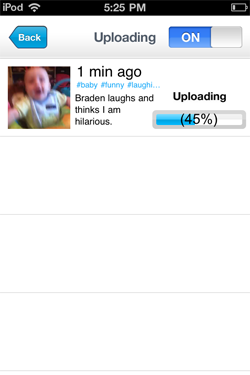
Unsurprisingly, my first Tout moments feature my kids, who are much cuter than I am, even in short clips. (See: Braden laughs and thinks I am hilarious. for one example) You can get started on Tout to add your own moments at http://www.tout.com.
April 19, 2011 · 2 MIN READ · BY LOUIS GRAY

Sonos Launches on Android, and Adds AirPlay to iOS

Sonos Launches on Android, and Adds AirPlay to iOS


Sonos, the company behind the futuristic wireless digital audio players throughout my house, announced the introduction of their long-awaited Android application this morning, bringing multi-room music management to the fast-growing mobile platform. In addition, the company also expanded its iOS offerings by adding support for AirPlay to its iTunes equivalent, enabling Apple fans to send audio from any AirPlay enabled app to Sonos speakers, including YouTube.


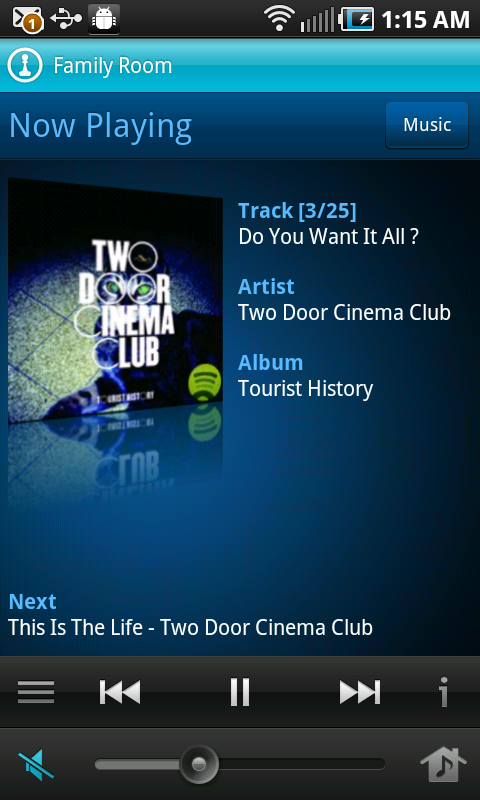
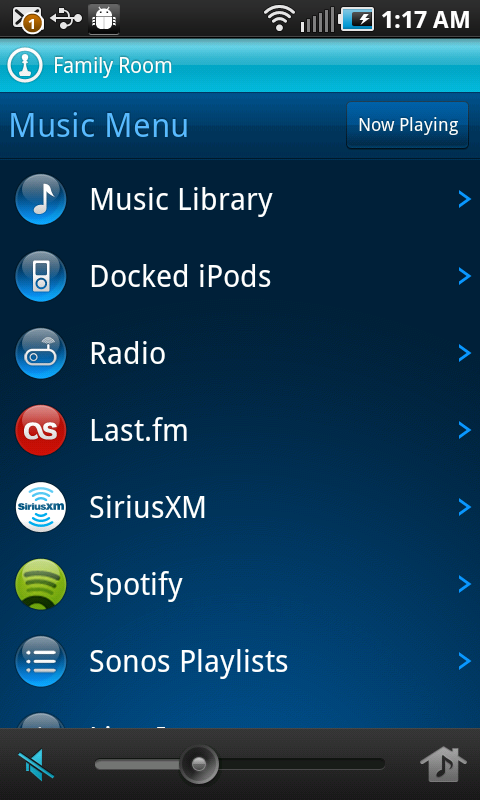
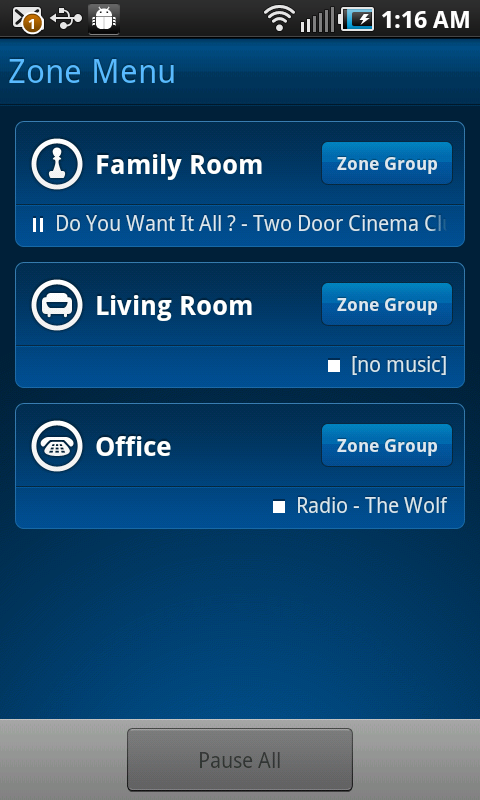
Playing a Song on Sonos and Flipping Through the Music Menu on Android


While it was no secret that Sonos had planned to launch on Android, having featured heavily in Google's Android booth at Mobile World Congress in Barcelona, the beta process for the Android app took a little longer than anticipated, thanks to some services' issues with buffering and ensuring a high quality experience over the expanding range of Android devices.


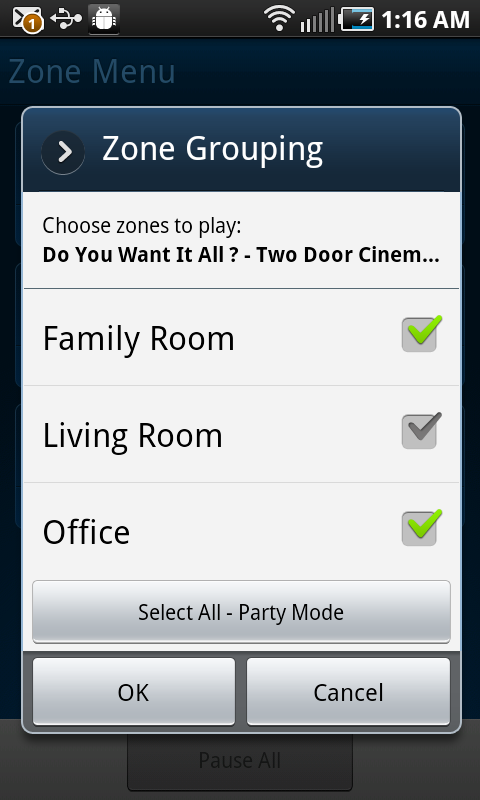
Grouping Zones on Sonos for Android


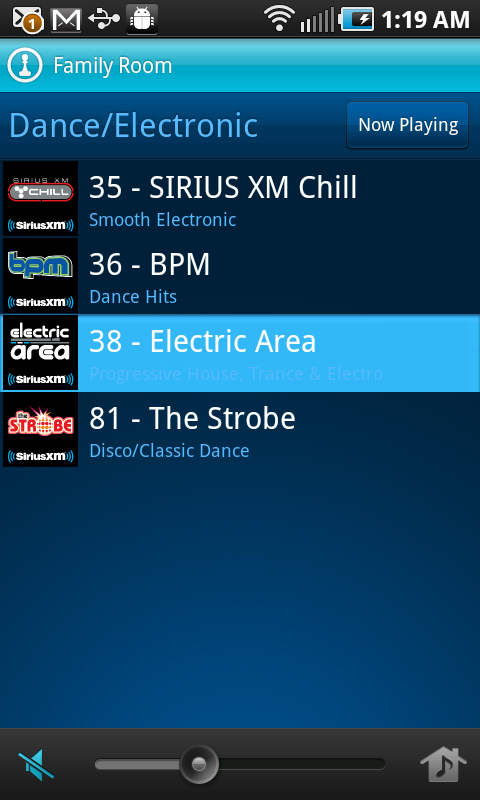
Since February, I have been using Sonos on my Android phone and Galaxy Tab to put all my favorite music on any room in the house whether it's just for me in the office, or in full Party Mode for guests throughout. As with its iOS equivalent, Sonos pulls from a wide array of musical sources, including Spotify, Last.fm, Sirius XM, Rdio and others. The sheer capability of demonstrating Spotify on Sonos, and showing people how I can get practically any song in the world, on demand, to any room in the house, has left people begging to have the capability themselves. Today's announcements brings that to even more tempted audiophiles.


Selecting a Song on Sirius XM or Spotify With Sonos


While I can't go as gaga as Robert Scoble over the future of AirPlay, sending audio from any playing music or video stream on the Web to Sonos speakers is another nifty trick. Imagine picking up a YouTube video, a streaming sports game, or simply an embedded MP3 on a Web site and kicking it out of your tinny laptop speakers, in exchange for full-featured Sonos. There's no reason you shouldn't always be using the best speakers in the house.

Android users can now go get, for the first time, the official Sonos build from the Android Market. iTunes users should watch for their devices to gain point upgrades later this morning.
April 19, 2011 · 2 MIN READ · BY LOUIS GRAY

Flapon Flaps Into World of Topic Based Social Networking

Flapon Flaps Into World of Topic Based Social Networking

No doubt unperturbed by Liz Gannes' panning of their "Flap On, Flap Off" branding, Flapon introduced itself Monday morning as a life-stream integrated social network aimed to help people find each other based on similar interests and shared topics. The approach, previously tried by the now-defunct Simler, Socialmedian and others, hopes that people's collaboration around mutual interests will encourage positive relationships, and enable people to share insights that bring value to other members of the community.

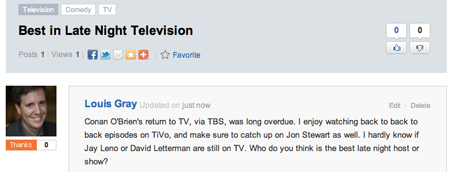
The main area of Flapon is referred to as the Stream. The Stream is comprised of "Flaps" from users on any topic. Essentially, the alpha version presents the public stream of all topics in the central space. Each Flap can be slugged with multiple topics, each of which can be clicked to find other discussions on that topic. And while you can add many different topics to each Flap, and be quite creative in your choice of tagging, Flapon comes bearing a full library of topics. This aids in creation of new content - for example, if you post on Conan O'Brien and want to tag the post as "Comedy", start writing, and like Google Instant, it autopopulates a list of options.

The Flaps Make Streams

A Flap on Late Night TV, Slugged as Comedy, TV and Television

Each item is self contained, getting its own permalink, with statistics on reads, as well as the option to vote posts up and down. You can comment on the original Flap, or reply to extend the conversation. Unsurprisingly, you can click on the profile of each Flap author to gain their bio, and Flap history. If you try hard, you can think of it as being Quora-like, without any leading questions. You just post what you're thinking, tag it, and keep going.

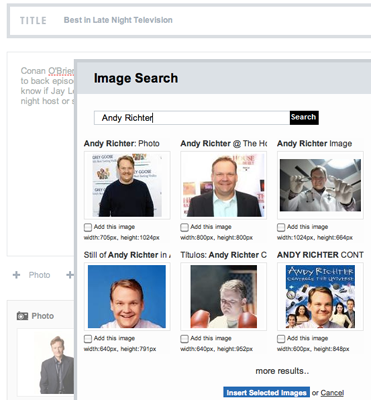
Creating a Flap With Images from Google

In its infancy, you of course won't find answers to every query. Searching for "Baseball" lands a single post on amazing facts. The phrase "Social media" has many dozens, reflecting the service's earliest users.

Assuming one of the core cruxes of social networking is social, it's likely only the bravest of cutting edge early adopters will find themselves posting to Flapon instead of the more popular destinations. The tagging of content is good, as is discovery of new posters and immediacy of feedback, such as posts and views. Addition of photos to each Flap is pretty simple as well, as you can pull from Google's massive image search repository.

If you want to get flapping with Flapon, just head to http://www.flapon.com to check it out. Maybe you'll enjoy the option of talking in more than 140 characters again, or you'll like seeing a public stream in its infancy stages.

April 18, 2011

April 18, 2011 · 4 MIN READ · BY LOUIS GRAY

Sosumi: Apple vs. World for Phones, Tablets & the Future

Sosumi: Apple vs. World for Phones, Tablets & the Future

Apple is not taking the war on iOS lying down. Bleeding from the wounds of a thousand cuts courtesy of the knives from the wide-ranging Android ecosystem, the company is taking on Samsung in the courtroom, targeting the Galaxy series of phones and tablets, just over a year from their initial suit against HTC, months after they sued Amazon for their App Store naming and six months after they sued Motorola for their use of multitouch. It's getting a little busy in Cupertino's legal counsel these days, and without suing their current nemesis, Google, outright, Apple seems to be throwing their significant market weight around. Despite being outnumbered, there's no question they believe they have both might and right on their side.

An early flashpoint in the return of Steve Jobs to Apple was the agreed upon cessation of legal wrangling with Microsoft over the famous "look and feel" lawsuit that claimed Windows had borrowed heavily from the Macintosh. Of course it had. But it was legal, thanks to shoddy early contracts. In the announcement of the stopped legalities, Jobs famously said, "We have to let go of the notion that for Apple to win, Microsoft needs to lose.'"

The ensuing (no joke) 13-plus years have put Apple in the driver's seat versus Microsoft in may places - in market capitalization, and leadership on music players, mobile phones, tablets and sheer brand desire. Microsoft didn't lose, per se, but they didn't have to get the verdict handed down from the courts. The verdict has been handed down in the world of public opinion and choice of quality products that saw the Zune dismissed as a joke and Windows Media become an also-ran, with CEO Steve Ballmer being a lightning rod of futility.

But this time around, Apple is the front-runner. They have market muscle, they have clear differentiation and leadership in hardware and software. They have an amazing app store with high quality software - a combination that is practically unmatched, even as Android has passed Cupertino by in numbers, and quality improves rapidly. This time around, they are not being loose with their contract work, patenting everything under the sun - from the implemented to the theoretical, and they are backing up those patent claims by taking on their competition directly. They refuse to go down without a fight.


It took Apple to change the way the world interpreted smartphones. It took Apple to introduce a successful tablet. It took Apple to turn the tide against peer to peer free file sharing and to a legitimate music and video store. In the years following their leadership, iTunes has in some ways been lapped by Spotify and other offerings. Android's flexibility means there are many choices in handsets which look remarkably like the iPhone. The Galaxy Tab, my tablet of choice, comes in sizes the iPad doesn't. But the volley of lawsuits smacks of preemptive desperation, not from a company in trouble by any means, but by one that wants to make sure it won't ever be.

In March of 2010, former Sun CEO Jonathan Schwartz wrote a post, titled, in a nod to Jobs, "Good Artists Copy, Great Artists Steal". In the post, he claimed that Apple going after the competition raised their visibility and relevancy to the market.
"Having watched this movie play out many times, suing a competitor typically makes them more relevant, not less. Developers I know aren’t getting less interested in Google’s Android platform, they’re getting more interested – Apple’s actions are enhancing that interest."
I can't say that more users and developers are flocking to Android directly because of Apple's moves, but it is wearing down on the good will that Apple has fostered with the general tech community. In a world where Apple has forged its own path, going practically partner free, owning their own pace and great margins, the rest of the world has been expected to choose a side opposed to their own - be it Android, be it Samsung's BADA OS, be it Blackberry or Microsoft Windows Phone 7 (see Nokia). By choosing to compete with Apple and to develop solutions that mirror the iPhones of the past, it's left them open for such courtroom drama.


At this point, I probably have nearly as many Samsung devices in my home as Apple devices. From the Galaxy Tab to my Galaxy S powered Epic 4G phone on Sprint and our TVs, I'm looking at Samsung logos many hours a day. So this particular lawsuit doesn't exactly give me the fuzzy feeling that Apple is going to enable a great electronics manufacturer to provide solutions users want.

At my last startup company, the market incumbent sued us immediately following the acquisition of patents they had gained through buying a dying market pioneer. The intent of the suit, which was baseless, was to prevent us from raising a $47 million D round, and to thwart our momentum. The lawsuit was a major distraction for years, and damaged our ability to sell to customers, until it was dismissed years later. I've seen the big market leaders come after the challengers to try and protect their turf, and it has me wary. I can't defend copying and a lack of innovation, but I hope customers don't suffer as the Valley goes to court.

April 17, 2011

April 17, 2011 · 1 MIN READ · BY LOUIS GRAY

Foursquare Day 2011: 3M+ Checkins, The Most Ever

Foursquare Day 2011: 3M+ Checkins, The Most Ever

Saturday April 16th was not just officially recognized as "Foursquare Day" by fourteen different cities this year, including the company's home base of New York City, but it also marked the busiest day the service has ever recorded, with more than three million checkins around the world - the first time this number has been achieved. To give an idea to the magnitude of this achievement, in March of 2010, the company announced its biggest day ever was 275,000 checkins, making Saturday's mark more than 1,000% higher.
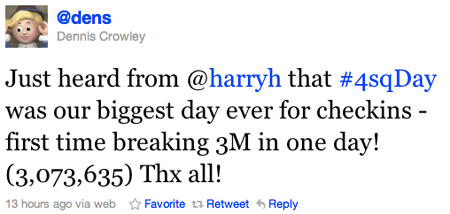
The number was calculated by Foursquare's Harry Heymann, shared by founder Dennis Crowley on Twitter, and repeated by Siobhan Quinn and other team members.


Foursquare reports it now has more than 8 million registered users, achieving the 8 million mark two months after it reached 7 million in February, 6 million in January and 5 million in December. Loosely tracked, the service is expanding around a million new accounts a month, and the number of checkins on Saturday accounted for roughly a checkin per two and a half registered users. Those active on Saturday (myself included) landed the Foursquare Day 2011 badge, an annual tradition.

After initial skepticism on the service, I bet on it following the hire of Blogger's Siobhan Quinn and other smart folks, including Dolapo Falola, formerly of Google, via Thing Labs and AOL. Now even my wife, not an early adopter, is checking in from place to place, and racking up her unfair share of badges. We both counted among Saturday's statistics.
April 17, 2011 · 5 MIN READ · BY LOUIS GRAY

Apple TV, Google TV, TiVo: Crowded Theater, All Good

Apple TV, Google TV, TiVo: Crowded Theater, All Good


There is no one perfect home entertainment gadget. No single gadget manages to record all your favorite shows on demand, has access to the deepest online library for new and older titles, syncs perfectly with services like Netflix and finds all the Web's video at once. Devices ranging from set top boxes like Apple TV, TiVo, Google TV, Roku, and Boxxee, and game centers including the Nintendo Wii, XBox 360 and Sony Playstation, and single-purpose devices like the Slingbox have been working hard to make our entertainment consumption world ideal, but each has its strengths and holes. In our home, we've tried to fill all the holes, and this requires multiple devices, each one finding a perfect niche that can't be replaced by an alternative.

We moved beyond the traditional VCR/DVD world in 2003 with the arrival of our first TiVo DVR -a series one. Since then, we added two newer boxes, the TiVo HD device and the TiVo XL, the bigger brother of the HD, with a terabyte of storage. While the Premiere line of TiVos emerged last year, it wasn't compelling enough an upgrade to make the move, but we're very happy with the pair we have.

In 2007, with Apple's release of the first generation Apple TV, we snapped up a 40 gigabyte model, which is in use today. Last year, I also picked up the newest model Apple TV, which is stream centric. Meanwhile, last month, after some delay, I added Google TV to the mix with a Logitech Revue. Having seen it panned by much of the tech press, and the multiple demos I'd received falling short, it took some hands-on testing at a local Best Buy to push me to bring it home.

So with all these boxes and companion remotes, how do I choose what to use? Like I mentioned last May with mobile phones, you have to look to the core of each device to find their specialty.

Each Product Has Its Own Core Focus

For the Apple TV, the product's strength is its tie to the iTunes store, specifically, the vast video library which contains more new releases for rent or purchase than alternatives. Google and TiVo have close links to the Amazon video store, but the experience has never matched that of iTunes. When we want to rent a movie for an evening, or purchase a video for my kids to watch (like Toy Story or Cars), it's on the Apple TV.

For TiVo, the product's strength has always been around its ability to time shift videos and record my favorites. A companion benefit is its show guide and search, to find future shows and set them to record. The TiVos upstairs and downstairs run our scheduled programming, and having tried crappy DVRs from Comcast, Dish and others, there's simply no parallel to what TiVo offers.

For Google TV, the device is Web centric, much like Android, of course, and most things Google touches. There's something fun about browsing the Twitter app on the full screen, browsing Web sites, and enjoying YouTube on a screen much larger than a laptop. Tired of my kids running into videos on YouTube with the iPad that weren't exactly my favorite, browsing YouTube myself with them in the room puts me back in control and reduces their digital ADD.

Another much-overlooked feature of Google TV is the ability to browse what's on, automatically sorted by genre. Like most of you with kids, being stuck with baskets of laundry is made much easier when watching something entertaining. Yesterday, owning this task, I checked what movies were on, found Knocked Up just started and amused myself through three baskets of whites and colored laundry. It's similarly very good for finding out what sports are playing anywhere on the TV dial.

Is Google TV Any Good? I Say Absolutely.

As the Google TV is the newest gadget for us, and I've covered Apple TV and TiVo many times before, it's worth saying how good the experience has been. Reading scads of reviews that slammed its utility, or the keyboard remote, I was very surprised how easy it was to setup and how immediate its benefits were. I was most concerned that putting the Logitech box between the TiVo and TV would somehow impact the TiVo's ability to schedule recordings. This turned out not to be a problem at all. The keyboard remote was as simple as any other laptop keyboard, and the Home key always puts me to home base, the center of applications, what's on TV, and is the conduit to browsing the Web.

Even more futuristic is the ability to use any Android device as the remote control with the Google TV app. There's some fun to using the Galaxy Tab as the remote control, with part of the app's screen space devoted to playing the role of trackpad. If you haven't done it, surfing the Web from the tablet to the big screen is pretty cool.

Obviously, each experience could improve some. The Apple TV doesn't know anything about live TV and doesn't have Safari running on it like Chrome does for Google. Google TV makes no attempt to record shows, even though it knows they're on. Meanwhile, the TiVo doesn't really know the real Web exists, despite tie-ins on Premiere with Web widgets and third parties like Netflix, Amazon and Blockbuster. But in our home, if we have an entertainment need to fill, we have a box to do the job.

PR around the Google TV has been pretty light since its initial launch, and one could guess that maybe we'll hear more about the product at Google I/O in May, the one year anniversary of its introduction. Maybe new hardware and TVs will be announced, or new content partnerships, after months of hearing that sites (like Hulu) want to keep Google out of their kitchen. TiVo is due for a big upgrade that maybe makes me update the older boxes. And Apple TV only really gets talked about when you hear rumors that Apple could go the true television route and release an HDTV line. They've certainly got the relationships with suppliers, and the best UI team on the planet. But if you know what you want out of TV, Google TV, Apple TV and TiVo all have a fit and each one brings value. So don't get caught up the tech news grumpiness you find elsewhere. Considering how inexpensive each device is, you just might get all three.

April 13, 2011

April 13, 2011 · 2 MIN READ · BY LOUIS GRAY

All Mac Users Get Unlimited Access to New York Times Free

All Mac Users Get Unlimited Access to New York Times Free

While most my news consumption comes through RSS (Google Reader), Twitter or on my phone (using my6sense of course), the New York Times home page is one site I still visit directly, and with some regularity. With their recent move to limit free access to the site to 20 articles a month, I haven't given it much thought - until yesterday, I saw I started to get little warnings that I had 2 articles remaining of my free 20, then 1, and then they were all gone. But as others have pointed out, there are so many holes in the Times' paywall, it seems to be an impotent approach, a limping attempt to squeeze much-needed revenue into the flagging old media giant. One of the biggest holes in the paywall is that of Safari - the Apple Web browser that ships on every Mac, and is available for Windows as well.

Without having to resort to any browser shenanigans, all Mac users have to do to read any of the New York Times' articles after the 20 articles are consumed is hit the "Reader" button in the location bar. While the New York Times begs you to pay up to read the full story, Apple extracts the text and repaginates it for you in a clean way - the entire article, whether you've paid or not.

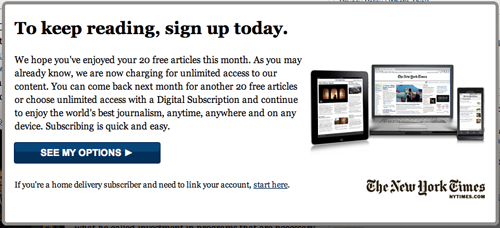
The NY Times Warns I'm Almost Out of Articles

What Happens Once You've Read 20 Items

The battle between publishers and news applications has been a push-pull tug of war between innovation and traditional media ownership. One has seen clashes with Flipboard and Pulse as two of the most recent examples, with Pulse even getting sued by the New York Times right after their mobile reader app launched on iPad last year. But technology always seems to win. For every half-baked scheme to force readers to pay for content they expect is free, technology finds a way around it, whether intentional or otherwise.

Clicking "Reader" In Safari Brings Every NY Times Story in Full

Considering Apple's extensive market weight, and Cupertino's highlighting of the New York Times in Steve Jobs keynotes, commercials and other features, I don't see the Times screaming at Jobs to get this particular circumnavigation fixed. It's just another thing it looks like the Times people didn't think about when they tried to force their most loyal (and even occasional) readers like me to pony up.

If you're a Mac user who has switched to Firefox or Chrome, this is one place where Safari has a leg up, so if you hit your limit on the NYT, just open up a second browser.

April 10, 2011

April 10, 2011 · 5 MIN READ · BY LOUIS GRAY

The Android and iOS War Is Not Mac vs Windows Part 2

The Android and iOS War Is Not Mac vs Windows Part 2


Over the last several months, I have seen scads of articles trying to equate the battle between Apple's iOS on one side and Google's Android on the other as a rerun of the famous Microsoft Windows versus Apple Macintosh battles that played out over the 1980s and early 1990s. In practically every case, Android is seen as Windows. After all, both operating systems have achieved market leadership (in most ways you could count leadership) through extensive partner relationships. In both cases, Apple fanatics look down on the alternative as being less polished. In both cases, the opposing non-Apple camp has the chance to revel in geekery, showing what's possible when you get to the system foundation, while looking down upon the more closed, possibly less flexible Apple option. But I would argue there's a different way to look at this conflict, and it comes down to apps - which flips the discussion on its head.

Microsoft Word 6 for Mac. The Pain Still Is Felt Everywhere.

As a longtime Mac OS user (and sufferer), I slogged my way through Apple's dark times in the mid to late 1990s, taunted by developers who would avoid Mac OS as a platform. Others, if they did choose to release for Mac OS, might do so well after comparable versions were issued for Windows. Often, the Mac version was a klutzy port of the Windows original, running slowly and awkwardly on Apple machines. While we had our own native apps that only ran on Mac, press and advertisers alike knew that Windows had the numbers - more users, more options and dramatically more software. Most of us Mac addicts were left to order out of catalogs instead of retail stores, quietly fixing our need like those with misunderstood fetishes, while Windows users gleefully got first-day shipments of PC titles with the latest games, office software, and multimedia. We begged for scraps, but our day eventually came.

In time, our once pitiful position, a mere blip in software sales next to the incumbent behemoth, changed. Under Steve Jobs' leadership the new Apple and Mac began to stand for something else - not just in quality, but in numbers. The popular titles that once were shipping Windows only started to ship for both Mac and Windows simultaneously. Large companies that once abandoned the Mac came back, or set up separate business units thad did a fantastic job creating quality software. The gap once felt in software has practically disappeared, and I can't remember the last time I felt longingly for a piece of software that ran exclusively on Windows, or found a hardware device that had forgotten to find a way to work well with Mac out of the box. I have an HP Laptop running Windows 7 (and IE) at home, but I've only had to use it to get into proprietary online meeting rooms that demand Windows. Otherwise, the notebook stays closed.

Does this mean that the Mac ever caught up in terms of the vast number of software titles? No. But no Mac user today feels the same way that we Mac users did eight or twelve years ago, because everything we can do on a PC, we can do on a Mac, and there are many different things possible on this platform that can't be done on Windows.

Top App Developers Are Coding for Android and iOS

This brings me back to Android. Apple's iOS has more applications than Android. It has a smart, well-organized, high quality store design that presents new and high quality apps to users for iPhone, iPod and iPad. The Android Market is close, but not perfect. iOS has a good number of applications that are iOS-only, which do not exist for Android, namely favorites like Instagram, Path, Flipboard and more - many more.

But, as I've predicted over the last nine or so months, since changing my mobile OS preferences, this is changing, just like the Mac issues of the past. The gap in software is closing in terms of the number of applications. The polish of Android is improving relative to that of iOS, as Google improves with each iterative release. The amount of software available is increasing to fill needs that were previously unserved. Soon Android users, if we have not gotten there already, will feel like the Mac users of today, where every need is served, and there is no lingering desire for anything on the other side of the mobile software divide.

You can see the dominoes begin to fall as iOS-only applications, like Path, publicly promise Android versions soon, while promising to wait and deliver an amazing experience. You see applications like Ninua start as Android only, and games developers deploy for Android while ignoring iOS. (See: Bionic Panda Games) I believe only the most ardent of iOS fanatics will stay single sourced in the long run, just like BBEdit has never strayed from its Mac-only approach (and boy do we love them for it).

For when it comes to the mobile applications piece of this skirmish, Apple is not Apple of the 1990s. It is playing a role more similar to that of Microsoft, who had more titles, more developers, and a seeming guise of invincibility. This is not a replay of that battle, but a new one where the challenger is now the dominant one, and behaving much like a dominant player would. What I like more about this specific discussion is that this time, in my opinion, both sides are great. I would take a market battle between Apple and Google any day over the frustrations and issues that took place with a dominant Windows of yesteryear. I still love my Mac and the iPad has transformed mobile computing. But let's not be so naive about the world of Android software. Developers, users and the entire Android ecosystem are going to be benefitting from continued progress and growth - in quality and quantity.

April 7, 2011

April 7, 2011 · 3 MIN READ · BY LOUIS GRAY

Ninua Launches Social News Reader on Android

Ninua Launches Social News Reader on Android

As I've discussed many times, finding the right news from your news streams and social streams is an increasingly difficult challenge - and for most people, traditional RSS readers have proven too difficult for mass adoption, despite my own feverish feed religion. Into the void steps a new reader, launching first on Android, to try and connect readers and writers through social news exploration, tapping into three main news reading pillars to try and deliver a high quality, polished news reader, competing with people like Pulse and Flipboard, but unique in its own right. The new product is called Ninua News Reader, and it's from the team behind NetworkedBlogs, the most popular tool for posting your blog entries to Facebook.

Ninua's approach to the world of news, as demoed at the 500 Startups Demo Day in Mountain View on Wednesday, is centered around three major news reading pillars, including:
  1. Headlines and Mainstream News
  2. Blogs
  3. What Friends Read
Founder and CEO Waleed Abdulla said the company was "trying to do news in the right way", by helping users follow friends who share your interests and learn new sources through their own reading lists. Unlike other news readers, including Flipboard, Ninua does not pull in social stream content from Facebook or Twitter, but it does use that increasingly-important social graph to help provide guidance for your eventual reading list. Abdulla said, "The Facebook stream is social, but it's not news. See what your friends are reading, and if you like it, you can follow them. The app is tailored to you based on the sources you follow and the friends you follow."


Selecting Topics and Sources in Ninua for Android


If it sounds simple, that's because it pretty much is. Upon installing and launching the app on Android, you're asked to select three topics of interests from a pre-selected handful. Dependent on your choices (for example: Technology, Startups and Sports), you are then presented with a list of matching blogs and news sources to follow - all of them prechecked to be added to your reading list. Deselect those you don't want, and then you're asked to connect to Facebook to match the social side of things.


Following Friends and Their Recommendations


Once you've found your friends using the app and what they follow, the app taps its NetworkedBlogs roots and finds other sites your friends may not just be reading, but writing. There's a good chance you'll want to add those to your reading list as well. Now you've got a healthy list of sources based on your interests, and a list of sources based on your friends' interests.


My News Front Page and One Story In Ninua


With this array of sources in tow, complete the setup and you can read the news from those sources you've selected, or you can add new sources. There's no mention of the word RSS, the word Feed, or anything remotely as scary as big words like Pubsubhubbub or acronyms like OPML. The resulting articles are laid out with social signals to show other upvotes, and you can share the articles you like best to other services.

Ninua is a new wrinkle on the social-centric reader, mashed up with your own interests. Unsurprisingly, the app debuts with a strong user experience, and it's calm enough to not make you feel like you're missing something on the next page or next refresh. It's a solid approach to simplifying the news reading process, especially on mobile. You can find it on Android Market here: https://market.android.com/details?id=com.ninua.android

Disclosure: I am vice president of marketing at my6sense, which offers a personalized social and news reader for Android, iOS and the Web. It can be assumed that Flipboard, Pulse and Ninua can be seen alternatively as competitors or potential partners.

April 5, 2011

April 5, 2011 · 3 MIN READ · BY LOUIS GRAY

Did You Know All Your Emails Were In One Basket?

Did You Know All Your Emails Were In One Basket?


Prior to this weekend, most of your thoughts around the word Epsilon were probably about Greek fraternities or toga parties, but headlines in the tech and security world over the last few days have us instead associating Epsilon with a company most of probably never heard of before - a massive email marketing company used by many top brands. A major security breach seems to have escorted customer email lists from respected companies many of us interact with every day, and with the names piling up, I have to wonder if we had any idea that this centralization of our relationships with companies was happening, or if we are all the unlucky benefactors of outsourcing gone wrong.

The fun started late Saturday when I first got an email from TiVo saying my email address and first name had been exposed due to unauthorized access to their email service provider.

Of course, if you know me, that's no big deal. Everybody and every spider in the world knows my main email addresses are [email protected] and [email protected]. Tough finding that out and combining it with my mysterious first name. You know I don't have too many issues around sharing my cell phone number either - this being a key focal point of a CNN.com article on the "death of privacy" back in December.

The String of Notification Emails

Modern anti-spam measures from both Apple and Google prevent most garbage from missing my in box. For more insidious emails, that fraudulently pretend to be something they are not, which is made possible from this breach, I am wary enough not to do anything foolish.

But, as many others soon found, the first notification of a breach was followed by a second, a third, a fourth, maybe more. The next two days saw more apologetic emails following the breach, from Best Buy, Hilton Hotels and Chase Bank, to name a few. The issue reminds me a bit of the Gawker hack in December that forced people to change their passwords everywhere, myself included. So now what's exposed is not just my email address and first name, but that many companies passed the buck by putting their customer lists in the hands of a single third party who wasn't prepared for such a responsibility.

(Of course, this single third party shrugged it off as impacting a 2 percent subset of their clients)

In the 8+ years I managed our company newsletter and mailing list, from 2001 to 2009, we used a variety of partners, including Responsys and GotMarketing. Later, we put our data into Salesforce.com, and never once suffered such a breach. But in the last few years, companies have gained the ability to self-manage one's database and marketing tools, and do so independent of other companies. There's no great reason that a single third party's mistake should open up the vault to such a bonanza of brands. What this specific failure does is expose that the type of multiple verification systems and complexity expected from us as consumers isn't followed quite as well at the very companies whom we trust to watch over our personal data.

I don't have any problem with putting my email address out there. I don't mind sharing my data with TiVo and Best Buy. I shrug at Hilton and have to trust Chase, or we're toast. But I have to think we're lucky this time that the type of data accessed was so relatively harmless. People are worried that this will lead to phishing attacks and later successful breaches that get more impactful information, but for now, it seems we'll be more annoyed than ever. But think about whether you knew that all of these companies were putting your data in one basket to be raided by one intelligent hacker...

Does knowing that all these brands stuck your data in one place make you feel less safe or more safe? I think we've got to have an alternative, and self-hosting with self-managed security is looking a lot smarter these days.

April 4, 2011

April 4, 2011 · 4 MIN READ · BY LOUIS GRAY

SB Nation's History, Philosophy & What to Expect from Tech

SB Nation's History, Philosophy & What to Expect from Tech


I was elated to read overnight that many former Engadget staffers had joined forces to continue their craft in a new home - teaming up with SB Nation, currently home to more than 300 sports blogs spanning professional and amateur teams around the world. The excitement came not because we need yet another technology blog network (as there are a few already), but because of their choice - partnering with a forward-looking company that has harnessed the fervor of sports fandom, giving people a voice, becoming the truest example of people-powered blogging in the world, driving addicting communities and real-world interaction around shared interests. If the same process is followed, but applied to the world of gadgetry, the results could be tremendous.

For those who don't know the history, the first blog to pioneer SB Nation was Athletics Nation, a baseball-centric blog covering the Oakland Athletics. The blog came about as Tyler Bleszinski, longtime A's fan and sufferer (as am I) couldn't find a place online to vent about the team in good times and bad. With powerhouse ESPN suffering from East Coast bias, and local papers having no way to interact with fellow fans, he was pushed by Daily Kos founder Markos Moulitsas to start a blog - which later spread to a family of similar blogs, beginning with baseball, and later branching out to all manner of sports, from mixed martial arts to cycling, figure skating and golf. If there's a sport that has fans who want to talk about it, SB Nation has been there.

Belatedly (for me anyway), I found Athletics Nation in early 2005, and my first thought was, "where have you been all my life?". The site promised real-time gameday threads to chronicle the day's contest, opinion posts from front page writers and regular contributors alike. Later, "Blez", as was his online moniker, gained access to exclusive interviews with A's general manager Billy Beane, owner Lew Wolff, and other players. Athletics Nation (or AN) was on the map, and started to be noted for its influence among die-hard fans. Bay Area sports journalists including Susan Slusser and Mychal Urban also made appearances, talking with ANers directly.

In July of 2005, fooling around with the Mac comics application Comic Life, I made a comic featuring then-A's player, Eric Byrnes, who would be amazing one play, boneheaded the next. (See comic) This silliness led to another comic and another, to the tune of three in five days, before the A's short-circuited my plans by trading Byrnes to the Rockies. With this void, Blez asked me to make an A's comic a regular feature, and the ANtics were born - posted each Sunday through the season and occasionally in the off-season. I kept this up for a few years, before tech and kids took over the rest of my life.

Meanwhile, due to the ANtics, I gained front-page publishing access to Athletics Nation, and was eventually put in the mix for gameday threads and other weekly posts, along with other unpaid writers who filled out the week. Opinion posts (like this one from 2008) could get 10 comments from the community or hundreds. Game threads always got hundreds, for the community would writhe in pain for every popout and celebrate every run together, regardless of geography.

Where SB Nation differs from all the other major tech sites is that fans have a voice - beyond the comment streams which often become full of vitriol. SB Nation blogs feature fan posts on any related topic, and the community generally does a good job voting up the great posts and highlighting the poorly thought out ones. SB Nation prides itself on linking to third party content and not regurgitating other's articles, even if the blog's main focus is not on break news and reporting, but instead being part of the experience.

SB Nation blogs typically have a pair or more moderators who can manage user accounts, delete comments, promote fan posts to the front page, or send users email to say they are on probation. Users can recommend great comments and posts or flag them for review by a moderator. And over time, since every participant requires a user name and one's history is attached to the user name, you see a real community develop, with people who have history and a shared experience. Blez and the Athletics Nation team celebrated the community through yearly "AN Days" at the Coliseum to take in games, and helped collect money from the community for appropriate charitable causes. AN even featured an online store for shirts and other gear that bear the site's name.

Since the site's start with a single blog, run by a diehard Eric Chavez fan, the burgeoning network now features regional hubs for local teams, a dedicated baseball hub (which I highlighted Friday) and a pattern of success which requires commitment to hard work, fun and community interaction. If the track record of SB Nation is to be repeated in the world of technology, you can expect writers that are accessible, fans who have a voice, excitement about gadgets and software, and a standard look and feel that has you knowing you've reached an SB Nation site upon first visit.

If you're a longtime louisgray.com reader, this shouldn't surprise you. In 2006 I highlighted the growing network. In 2007, I highlighted the home page revamp. In October of 2008, I highlighted their mobile site work and subsequent funding round. I have been a longtime believer in the model of fan-centric publishing and it's clear that it has worked. If the SB Nation Tech team is half as successful as the sports side has been, there's no question the network will be a must-read, go-to, community.
April 4, 2011 · 2 MIN READ · BY LOUIS GRAY

Gumroad Launches To Sell Digital Goods With a Simple Link

Gumroad Launches To Sell Digital Goods With a Simple Link

When selling digital goods, be they PDFs, photos, art, icons or anything else where a download completes a transaction, creating an online store can seem complicated. A Google Checkout Web Element, released last year, simplified things a bit, but a new entrant, hacked up over this weekend, makes the transaction for posting and delivery as simple as a link, with no need to ever create a custom store. The solution, which is raw, but shows potential, is called Gumroad.

The project of Sahil Lavingia, who is better known for his work on iOS apps like Dayta and Color Stream, was cooked up with the aim to let friends send simple links to each other over sites like Facebook and Twitter, and recognize real revenue from the transaction. So long as the seller has an e-mail account associated with PayPal, there's hardly any setup required.

Setting Up a Sale on Gumroad

To start selling digital assets with Gumroad, you need to set up a user name and password, and then you can post links to your digital goods, assigning prices, title and description. Once you share the link, users can buy the goods, and the money, minus a cut that isn't yet finalized, will be deposited to your PayPal account.

I tested the service this morning, posting links for a set of PDF'd comics I made of Oakland A's players from 2005 to 2008, and also the FTC disclosure icons Jeannine Schaeffer made at the end of 2009 for bloggers with conflicts. Try both links - they lead to Gumroad, and if you want the full set, it could cost anywhere between 2 and 3 bucks. It's very easy.

Promoting the Gumroad link on Twitter

If there are questions about this service's usability, they become like those on other payment systems. If I get the eventual URL for the digital asset, why not pass it around for free? Why not upload that asset to a peer to peer (P2P) service? And why should I trust this service with my credit card data and secret code? They may use HTTPS, but the service could do more to make me comfortable to do transactions. It's also not clear how fast money gets deposited to PayPal.

Showing 1 download at $2.99 In Gumroad

All those caveats aside, it's an interesting experiment by a known developer who is trying to think of new ways for us to do transactions with one another simply, much like eBay, PayPal and Square have. Check it out at http://www.gumroad.com.

April 1, 2011

April 1, 2011 · 3 MIN READ · BY LOUIS GRAY

Baseball Opening Day: New Site, New App and New Access

Baseball Opening Day: New Site, New App and New Access


In our home (and blog) we don't celebrate April Fool's Day. But we do celebrate the opening of the baseball season. While for some teams, the season actually started yesterday, true opening day for major league baseball hasn't begun until today - as that's when the A's take the field. Kicking off the baseball season this year, there are some great advances in the world of baseball that every baseball fan should know to start the 2011 season off right, including a new site in the amazing Sports Blogs Nation franchise, a new baseball game for iOS and Android, and the extension of one month's MLB.TV to all MLB At Bat purchasers on all platforms.

In the tradition of baseball's 1-2-3 strikes, here are the three big stories.

1) Baseball Nation from Sports Blogs Nation

Sports Blogs Nation has been the true fans' sports network for almost 8 years, starting with my favorite, Athletics Nation, and first slowly, then rapidly, taking over the world with dedicated blogs for all major sports teams, most colleges and many specific sports globally. The fast-growing network is practically going pro this year, with the higher of former ESPNer Rob Neyer, one of the most respected baseball authors and stat geeks you'll ever see. He is now running a brand new baseball entry page to SB Nation, which pops up the league's top news, runs near-live scores, columns, and deep integration into the dedicated team sites. Every baseball fan has to check this out: http://mlb.sbnation.com/

Sports Blogs Nation's success has me somewhat wistful I didn't double down on my early work with Athletics Nation in 2005 and Sactown Royalty from 2006 on, but I traded in my athletic gear for a slide rule and glasses with tape in going geek. Tyler Bleszinski, Jim Bankoff and team have done an amazing job with the franchise.


2) Free MLB.TV for the month of April from MLB

I've purchased MLB At Bat 11 on both my Android and iOS products. It's the best way to follow games around the country. MLB.com sent me a note today that customers will get access to streaming live video from any game through the month of April. They're hoping they'll get you hooked and you just might.

3) 9 Innings Pro Baseball Hits Android for Free

Com2uS has long made the best baseball games for mobile devices. In early 2010, I told you how 9 innings on iOS kept me from missing real baseball too much after a long and cold off-season. The company's Home Run Battle 3D game is amazing on both iOS and Android, looking fantastic on my Samsung Galaxy Tab, wasting countless hours for me swinging at off-speed pitches. The new 9 Innings Pro baseball game for android comes to Android for the first time, and is free, using the newly released in-app building to help you follow your favorite teams during the baseball season. The game is made in association with the Major League Baseball Player's Association. It also works on iOS.

So there you go. In a few hours, my favorite team takes the field. But before that, I am going to read Baseball Nation to see what's new, maybe catch an out of region game on MLB TV and play a little 9 innings. It's in the name of the real holiday - Opening Day.
April 1, 2011 · 1 MIN READ · BY LOUIS GRAY

Quora Tweaks Follower Emails to Include Avatars, Topics

Quora Tweaks Follower Emails to Include Avatars, Topics

Following in the footsteps of Twitter, Facebook, FriendFeed and other social networks, Quora updated its new follower notifications overnight to now include user avatars, the number of topics the users are following, and the topics themselves. Combined with the service's new approach of aggregating daily follows and posting them in a single email at 2 am Pacific time, one can quickly get a summary of user activity on the network and click to view new follower profiles.

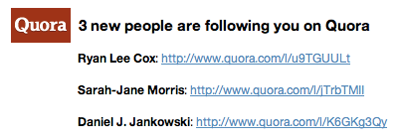
There are other small changes to the follower notifications email. Instead of being labeled as "XX New People Are Following You", the connections are posted as "XX More People Are Following You", which probably is more accurate as it's not guaranteed that new followers are new to the system. Also, links to user profiles are not represented by machine-generated profile URLs containing random alphanumeric strings, but the more human-friendly "Click here to view User Name's profile".

The Old Notifications Email from Quora

The New Notifications Email from Quora

Minor changes to be sure, but much more useful than names disassociated with their photos and interests. It also could serve to help avoid people aiming to drive up their follower numbers through odd user behavior. It's possible Quora will start to show follower/following data and mutual connections as Twitter and others have done to deliver more social signals in the future. To show up in my email tomorrow, you can follow me here: http://www.quora.com/Louis-Gray