Silicon Valley Technology Commentary & Archives · Est. 2006 3,045 Posts · 2006–2026
Showing posts with label automatic (4 posts). Show all posts

November 7, 2014

November 7, 2014 · 4 MIN READ · BY LOUIS GRAY

Our Smartphones Have Surpassed Their Role as Computers In Our Pockets

Our Smartphones Have Surpassed Their Role as Computers In Our Pockets

The prevailing mantra holds that as our phones become increasingly smart and constantly connected, that we're walking around with the equivalent of computers in our pocket.

These intelligent devices can do practically everything their PC predecessors could, from email and web browsing to document sharing and creation, music and photos, and any application you can think of. In fact, I'd argue that we're not only seeing people spend more hours with their mobile devices than traditional PCs, they're more functional as well - as the smartphone has surpassed the PC. Ever try taking photos with your iMac? It's tough.

Now, instead of considering these phones and tablets as miniature computers, which are used to access our desktop content on the go, we're seeing the reverse take place. The smartphones are initiating the activity, and the desktop connects us to the results. Instead of many small computers in our pocket, our PCs are essentially larger versions of our phones - and we come to our Web browsers and desktop apps to pick up where our phones left off.

Rachio's Web site is as Functional as the App

Not too long ago, it was common to expect apps to be made for our smartphone platforms that were extensions of our Web experiences. These simple mobile apps were wrappers for our cloud-based data, or simply sucked down web pages and media, but didn't offer experiences that were enhanced by being mobile. It was just a mirror of what you could get on the desktop. However, as the app ecosystem exploded for iOS, Android and other platforms, coding for the smartphone became the primary destination and effort for new companies and ideas.

Automatic's Web dashboard leverages data from the mobile device.

You could see this evolution go in a a three step process, from "Mobile too" to "Mobile first" and in many cases now, "Mobile only." Mobile experiences can't just be a shadow of the desktop version, but instead are now carefully crafted to meet rigid design expectations, with a user experience that adapts for smaller screens, and gets better with understanding of the user's location data or other apps installed on the phone. We're spending more and more time inside of our mobile apps, which can be our primary messaging and sharing vehicle, our second screens while watching TV or using the desktop, or a constant companion - to the point we hold them in our hands as we walk everywhere, or put them out on the table in front of us wherever we may go, waiting for the next chirp to grab our attention.

Fitbit takes its data and makes smart charts and graphs on their site.

The natural evolution of this mobile first, mobile centric reality is that we're now no longer going to our phones to pick up where our desktops left off, but the reverse. And when I do end up in front of a full-sized keyboard and monitor, I'm clamoring for smart Web experiences in my browser that reflect activities that have happened on the phone. If it's a miss, I may end up closing my laptop and picking up my Nexus 5 instead.

For applications that are primarily experienced on mobile, seeing a strong Web interface that contains the same data as on mobile is a pleasant surprise. You can see this difference in the way Fitbit has worked hard to have a great Web experience to mirror mobile, while the Moves app does not. Automatic and Rachio have a workable Web experience to match their mobile version.

Managing the Nest thermostat via the Web - same as the app.

Not too long ago, trying to use the Web and get data on our phones was exasperating. We had subpar experiences, had to make excuses for short email replies, or say we'd get to something when back at the desktop. But now, often, when at the PC, you're pining for what's on the phone - even if you can send texts or make voice and video calls from the browser. It's delightful to see when the two are working in sync, and the desktop experience makes the phone experience better. As a user, I'd be delighted to see the front-end experience for the same shared back-end data become more in sync and know the devices are working well together for every service.

Disclosures: I work at Google, who is behind Android, owns Nest, and makes browsers and apps for desktop and mobile. I work on the Google Analytics team, which has a great web experience and mobile apps for Android and iOS. (The first version of this post incorrectly said Nest didn't have a strong Web interface. I was wrong.)

September 30, 2014

September 30, 2014 · 3 MIN READ · BY LOUIS GRAY

Automatic and Fitbit Data Show My Car Use Down 50% as Steps Are Up 33%

Automatic and Fitbit Data Show My Car Use Down 50% as Steps Are Up 33%

It seems fairly logical that if you walk everywhere, you're probably driving less. But even as I've been on something of a Fitbit kick since early 2012, I've reached even higher highs in the last month-plus, and increased my daily goal to 15,000 steps (from 12,000), thanks to one simple change - opting to leave my car at home each workday and benefit from one of Google's most visible perks, taking the company shuttle.

Looking at the data from Automatic, my dashboard shows I'm on pace to have set a new low for both miles driven and money spent on gas, this month, a full fifty percent below previous months. And even without the aggressive late evening walks I was orginally doing when losing my extra weight at the end of 2012, my step counts are up more than 30 percent from just a few months ago. You might think that's not worthy of a blog post, but the available data, and correlation from this simple life change is easy to document.

A new low for driving costs in September (via Automatic)

Prior to taking the shuttle, my routine was fairly simple. I'd walk the twins to school, drive to work, walk a bit to lunch and do usual scurrying from meeting to meeting, and get home well short of 10,000 steps. To hit my target of 12,000, I'd still have to head out at night and get the steps in. But now, after walking the twins to school, I head back home to get the laptop, and walk the mile plus to the nearest shuttle stop instead. I work on the shuttle until reaching campus, and by the time I'm at my desk, I've racked up 5,000 to 6,000 steps. I can easily hit 10,000 after walking to and from lunch, and by the time I head home, I'm close to 15,000 steps - good enough for reaching my higher goal. And if I want to head out, be it to walk our dogs or play with the kids or anything else, I'm just padding on, getting closer to 20,000 without too much effort.

Hitting 20k on Fitbit isn't an ordeal with a new shuttle routine.

Meanwhile, my poor car is sitting neglected. Instead of driving into work and doing battle with other Bay Area commuters, the shuttle driver is escorting me (and my colleagues) while I catch up on email, keep our social channels updated, and generally get my first 20-30 minutes of work in - while I'd probably just be listening to the radio and stuck in traffic on the old routine.

When I first got the Automatic dongle back in April, I was intrigued by it catching me going too quickly or doing other bad behaviors while on the road that might cut into my gas mileage. But with few exceptions, the occasional chirp hasn't really impacted me. If I'm on 280, I'm going to drive over 70. It's what the road was made for. And if I'm driving to an A's game in Oakland, there's no question I'll have to hit the brakes occasionally, to avoid making traffic worse. But having the accumulative dashboard is even more valuable. I'm not at the point where I'd consider getting rid of the car, and sharing my wife's minivan, but there are some weeks where I might not even start the car. Google Shopping Express handles almost all our shopping, and we can walk almost everywhere else.

Earlier this month, I hit 60k steps, a new record. Some day I'll get 100k.

Meanwhile, in Fitbit land, thanks to being pretty consistent about promoting this socially connected pedometer for the last two-plus years, I'm continuing to enjoy the daily and weekly competitions, literally around the world. +Thomas Power in London is now tweeting his daily step counts, and harrassing me if I fall behind. In something of a response, a few weeks back I made walking an all day thing, and hit a new personal best of 60,000+ steps. It just took walking on the treadmill while watching TV, and then a stroll to Mountain View after the kids were in bed. It was to prove I could do it, and put the rest of my competition in their place. No car was needed. The new goal? Some day I'll hit 100,000. I just need to get a free day from my wife, and walk around the clock.

So if you're looking for me, I won't be in the car. Find me on Fitbit instead.

April 14, 2014

April 14, 2014 · 4 MIN READ · BY LOUIS GRAY

Automatic Takes On My Driving Data, Says Slow Down

Automatic Takes On My Driving Data, Says Slow Down

Data makes you smarter, and can make you improve your behavior. The more we learn about how what we consume impacts our bodies, how exercise can help you lose weight, and how smart energy use can reduce costs and be helpful for the environment, improves all our life decisions.

I've been a staunch Fitbit fanatic for about two years now, quickly brought Nest and Sunrun into my home to reduce our energy demands, and am now sporting a new device in my car that tracks my speed and acceleration, to help me save money on gas and be more efficient overall. The app's name is Automatic - which I first talked about back in May, but only finally received a week or two ago, when they completed the first rollout of their app on the Android platform. And now, every single time I drive my car, no matter where I'm going, the app (and the dongle which attaches by Bluetooth to keep things updated) are watching and alerting me to when I make any moves that aren't perfect.

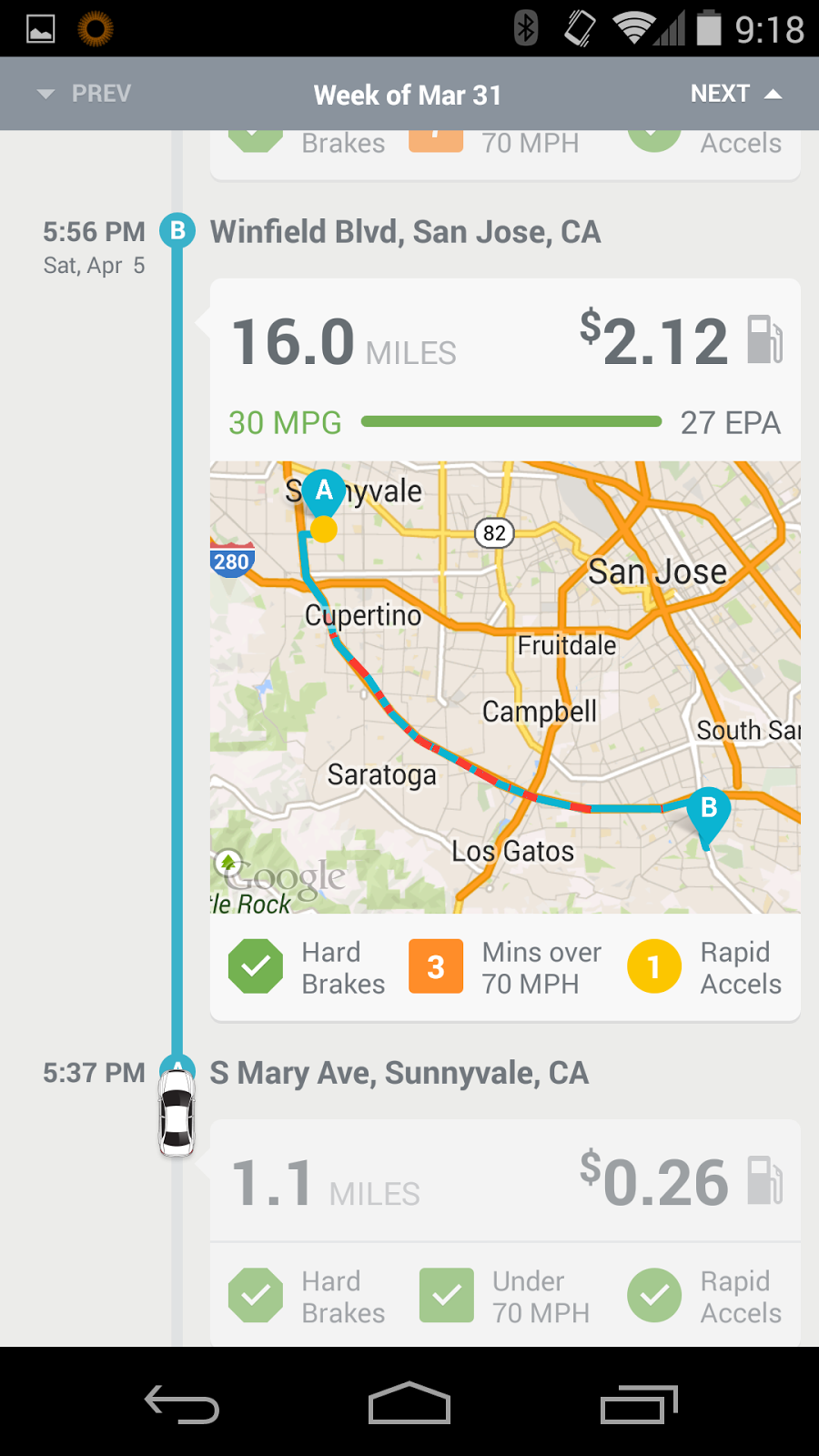
Trip reports from Automatic Show Costs, Quality of Driving

Setting up Automatic was, as you would expect, very easy. I unpacked the device, plugged it into my car's on-board computer, connected it to my phone through their dedicated app, and was good to go. The pairing tracks every trip, including distance, speed and estimated miles per gallon, and uses that data to provide an estimated cost of the trip and an overall score, starting with 100 for driving perfection, and deducting any time I step out of line.

You Can Scroll Through Previous Trips and Get a Score from Automatic

Automatic's assumptions for what makes for bad driving are simple as well. It's assumed that if you are driving over 70 miles an hour, that you're using more fuel than you should. So every time I get out on open highway in my BMW, capable of doing much more than 70, and I hit that mark, the Automatic device makes a chirping sound, telling me to slow down. If I stay above 70 for a sustained amount of time, the alerts continue and seemingly change tenor to be more dramatic.

I also get alerted if I accelerate too quickly from a stop, or if I brake too suddenly (though I haven't yet encountered that in my small sample size of use so far). So if I peel out of an intersection, Automatic bleep bloops at me and marks it on my permanent record (so to speak) through the app, so I can feel guilty later.

I Can Even Locate My Car and Diagnose With Automatic

And like any good app that monitors driving, Automatic is set up to be your wingman should any problems arise. The dongle monitors engine health, and promises to avoid your needing to go to the dealership for repairs if your check engine light goes on, taking away one of life's greatest mysteries. Same goes for the hopefully unlikely chance you're in a crash. Using its crash alert capabilities, Automatic swears it can report any accident to the proper authorities, even if you're unable to. I hope to never ever use this feature, but any added value in my book is a good thing.

So what of my trips? I haven't taken the car out for a long drive of any massive length since getting started. As I found when I started using Fitbit and later, the Nest thermostat and SunRun solar panels, simply having the data in front of me had me thinking about the sources of the data a little bit more. I walked more. I ate less. I turned down the heat and root for sunny days to save me money. To avoid getting yelled at by my Automatic, I find myself hovering around 68-69 miles an hour instead of above 70, so my overall score gets closer to 100.

The Automatic Link dongle for your car - not so big.

But I'd also like to give Automatic more data - like telling it to alert me if I'm going 10 MPH or more above the posted speed limits, or to set the speed warning at 75 instead of 70, little things that would make the device and accompanying app a little better and more personal, instead of acting like one size fits all. Also, by looking at the data, I found the one time I sustained my speed above 70, on highway 280 here in the Valley, I actually had higher miles per gallon than average. So it could be what's always considered bad, maybe isn't.

It's early days for Automatic for me, and I'm bullish on the trend of gadgets making us all smarter. So if I can withstand the occasional sharp chirp from my Automatic Link telling me I'm a non-ideal driver, over time I'll get even better. And I'm looking forward to even more data as the sample size increases. You can check out Automatic at https://www.automatic.com/.

May 23, 2013

May 23, 2013 · 3 MIN READ · BY LOUIS GRAY

Apps and Gadgets Optimizing More of Your Life Data

Apps and Gadgets Optimizing More of Your Life Data

It's been just over a year since I started my experiment with Fitbit, tracking not only my every step daily, but also my weight, learning how I measured up against my peers and against myself. The act of tracking my information, and keeping up with my peers, along with an irrational desire to stay atop virtual leaderboards, led me to lose thirty pounds at peak, and with little dramatic effort, I dropped 7 inches in my waist and have had to rebuy clothes more than once.

But Fitbit hasn't been the only data tracking app I've made part of my life, and I'm looking forward to more, for information truly is power, and as you start to quantify and measure that power, you get results.

If Fitbit is about tracking your activity, how much energy you burn, and how far you get with that effort, it's not too much of a stretch to see Nest's smart thermostat as Fitbit for your home. The attractive Nest dial not only is a small conversation piece in our home, but it has simplified our heating and cooling, letting us manage our home via smartphone and the web, all while getting regular reports on how much we've tasked our utilities.

Okay, thirty pounds is enough. I don't need more badges.

I purchased our Nest thermostat in March of last year, and that means we've gotten through a full twelve months, giving us enough data to check usage year over year. Even with the usual caveats of weather variations, kids needing more laundry done due to more activities, or anything else, it's clear we routinely have saved anywhere from $40 to $100 a month in electricity and gas with Nest, which means we broke even on our $299 purchase within six months.

PG&E Agrees We're Saving Energy and Money

That catapults Nest from the "fun gadget" category to the "real benefits" category. It doesn't take a brain surgeon to say that you use less heat when things warm up, like my monthly Nest Energy statement from April reported, but it does take smart science to learn when my family is in the house, and how to cool or heat our home at the right time, so nothing is wasted.

Monthly variations from Nest hit my email, showing use.

Fitbit and the Nest aren't the only devices that urge you to be better with the delivery of data and smart analysis. Today, I got more excited about a new gadget than I've been in some time, when I stumbled upon the promise of Automatic.com, and their early stage smart driving assistant. The assistant, which you can read more about on their site, sucks down information from your driving behavior, sends it to your phone, and helps you learn how you can change your behavior to save money on gas, and generally be a better driver. It even promises to help diagnose mysterious issues that flare up with everyone's car now and again.

Obviously, living and breathing a world like Google, as I do, we're thinking about data and separating good information from bad all the time. But this isn't a story about Google. It's a story about how smart thinking and critical application of the right information can make your life a better one. You don't need ten posts from me that crow about how Fitbit has made me thinner, but it did. You don't need me to tell you I'm one of the cool kids who has Nest, but I did get one, and I'm very glad I did. In months, after my preorder of the Automatic driving assistant comes through, I bet my driving may change in the same way my walking has - and the same way we don't have our air conditioning and heater constantly blaring.

We're in an interesting time in technology, where we're moving from a counting data for data's sake, and posting it without filters, like the first passes with Last.fm and Foursquare, to a utlity-based model, where the machines and software are getting smarter, teaching us and guiding us to be better. It's really exciting when you think about it - as we move not just from quantitative data, but qualitative data, and present it in such a way that it's not just for the geeks, but for everyone. Bring on more gadgets like this, please.