Silicon Valley Technology Commentary & Archives · Est. 2006 3,045 Posts · 2006–2026
Showing posts with label application (7 posts). Show all posts

March 14, 2009

March 14, 2009 · 1 MIN READ · BY LOUIS GRAY

Apple iPhoto to Integrate Facebook Connect

Apple iPhoto to Integrate Facebook Connect

During Dave Morin's presentation on a search for a more social Web at the SXSW conference today, the senior platforms manager for Facebook mentioned the company would be integrating Facebook Connect with Apple's iPhoto consumer program, in what could be a big step for Cupertino away from their forced vertical integration with Mobile Me, and more toward an adoption of the broader social networking community.

As Facebook grows in visibility, it's no surprise that companies big and small are looking to tap into the service's reported 175 million accounts. As Morin said during his presentation, "The desktop is getting more important in terms of integration with the Web." And the move for iPhoto users to upload their photos to Facebook, add tags and other social data further blurs the line between what is a desktop app or a Web app.

Apple has long considered it one of the leaders of the Web - despite having zero presence in search, portals or social networking in general. The company's long in the tooth iTools to .Mac to MobileMe transition has never really gained traction with the masses, even though the company's iPhone/iTunes and iLife families have been tremendously successful. That they are moving to work with Facebook and support the integration of the service indicates they're trying to dismiss the "not invented here" mentality.

Morin did not indicate which version of iPhoto would include the Facebook Connect option, or a timeframe, but given the presentations by multiple iPhone app developers having integrated the same technology and APIs, it likely won't be too long.

February 20, 2009

February 20, 2009 · 2 MIN READ · BY LOUIS GRAY

Adult Party Games On the iPhone? Get Penalized.

Adult Party Games On the iPhone? Get Penalized.

Usually we keep the blog on the safe side of PG, but it's late on a Friday night, and we're bending the rules a little. In the months I've had my iPhone, we have profiled a good number of innocent games, from jumping frogs to falling blocks, but not all the fun comes for kids with cartoon animation. Apparently, adults want to have fun too - and now the iPhone can be involved, with a silly game called Penalized that offers challenges, with the penalties being what you desire - be it loss of money, loss of sobriety, or loss of clothing.

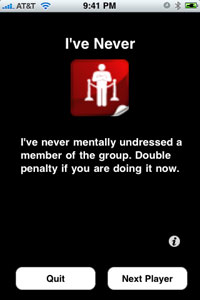
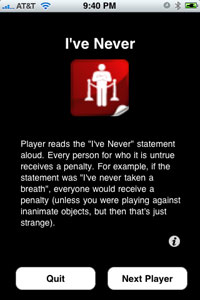
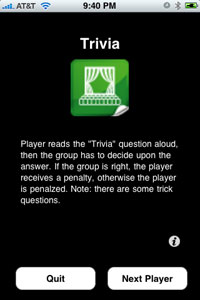
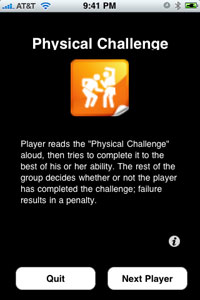
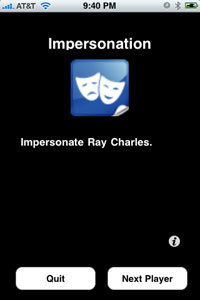
The game, which requires two or more players, of course, displays unmarked cards which when revealed can display categories such as "I Never", "Impersonation", "Trivia", "Rhyme", "Physical Challenge" and "Penalty".


Penalized: I've Never Done What Now?

Each card reveals a statement, such as: "I've never mentally undressed a member of the group. Double penalty if you are doing it now." or "All virgins receive a penalty (and everyones pity)."

As you can guess, the hope is that everybody else gets a penalty, and you don't. If your impersonation isn't successful, according to the group, it's a penalty. Get the trivia wrong? Penalty. Can't do a physical challenge? Penalty.


Penalized: Trivia and Penalties for All

The game itself presents an odd mix - the silliness of Strip Poker and Truth or Dare with the geekiness and isolation of iPhone Apps. So in order for this to work, you need to find someone geeky enough to download the app, but popular enough to get a group together and play the silly game. And before your sensibilities come into play, not all the items are PG-13 and above in nature. For every virgin-related or fantasy-type card, there are ones as casual as impersonating Ray Charles, or stating if you have never broken a bone.


Penalized: Challenges and Impersonations

The author, Scott Goldie, who you might remember as the author of FriendFeedMachine, knows the game isn't exactly aimed at my demographic, saying, "It's a fairly off-the-wall party game best enjoyed after a few drinks and with a group of friends... probably best suited to single college students rather than fathers like you and I."

But even if you're not a single college student, you still might want to check out Penalized and have a little fun. It'll set you back all of $3.99. And yes, iTunes rates it 12+ for suggestive themes, mild sexual content and mild profanity or crude humor.

October 27, 2008

October 27, 2008 · 2 MIN READ · BY LOUIS GRAY

Poll Tracker '08 By Slate Brings Election Updates To Your iPhone

Poll Tracker '08 By Slate Brings Election Updates To Your iPhone

With the United States' presidential election looming next Tuesday, daily polls at the state and national levels are growing in importance, as Barack Obama looks to maintain and increase his lead over John McCain, and McCain and his team hope to repeat the Republicans' success in the last two elections, by securing votes in the swing states and holding their base. While the dual party competitiveness and strategy is not new, the fact I can track the day to day moves on my iPhone is. When not in front of the computer, checking out Electoral-Vote.com or FiveThirtyEight.com, I can see the most recent polls by using an app called Poll Tracker, which runs at only 99 cents.


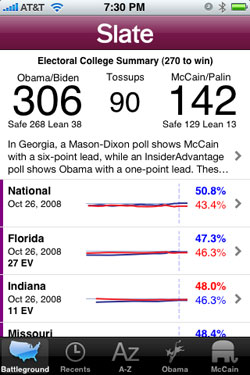
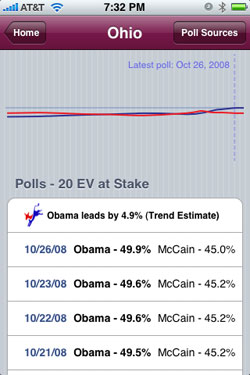
The Electoral Vote Count, If All Polls Are Accurate, Is Displayed

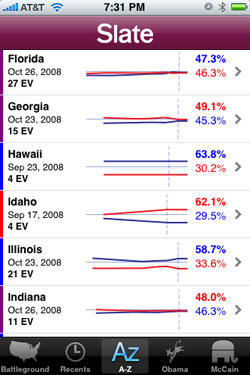
Poll Tracker '08 By Slate has five major tabs within its application, including "Battleground" for hotly contested states, as well as the national poll, "Recents", showing the most recently updated state results, "A-Z", showing all states alphabetically, and one for each of the candidates, "Obama" and "McCain", represented by their respective party mascots, donkey and elephant. Those two tabs show the states with the candidates' greatest lead differential, from highest to lowest. For Obama, that's Washington D.C., where he leads 82% to 13%, and for McCain, it's Idaho, where he leads 62.1% to 29.5%, according to the last poll.


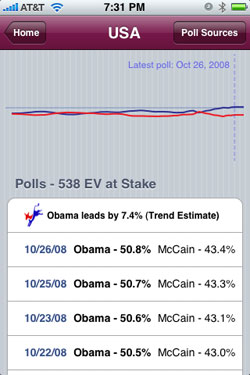
You Can Display Trends By State Or Nationally

While the latest snapshot of poll numbers is the most accurate measure for how next week's election may turn out, it's the individual state graphs I find most interesting. By tapping on any state, be it Florida, Ohio, Virginia, or Missouri, you can see how the state's residents have been surveyed over time, and get a good idea as to which candidate is trending in the state. Enough blue graphs on the upswing, and you can guess Obama is doing well. But if it's red you see headed up and to the right, it's the Straight Talk Express on the move.

Poll Tracker '08 admittedly has a sort shelf life. It might get a whole lot less interesting in about 10 days, and it won't give you the minute by minute updates we'll all be biting our nails over next Tuesday, but at $.99, it will deliver good value until the last vote is counted.

You can find Poll Tracker '08 By Slate on Apple's iTunes Store.

October 23, 2008

October 23, 2008 · 6 MIN READ · BY LOUIS GRAY

Social Media Workflow on the iPhone

Social Media Workflow on the iPhone

By Phil Glockner of Scribkin (FriendFeed/Twitter)

I wanted to write a slightly different type of iPhone app review today. Instead of focusing specifically on one or two apps, I wanted to bring you with me as I walk through the tools I rely on daily as I check out the social media ‘scene.' Also, I'd like to prefix by stating that the iPhone has been an amazingly capable and flexible platform for web-based activities such as this. Not only does it work better for me than any mobile smartphone I've used in the past, but has completely replaced my trusty Nokia 770 internet tablet.

E-mail

When I pick up my iPhone in the morning, the first thing I check is new e-mail. Not very exotic, but this is something that needs to be done well on any smartphone. I'll disclose here that I've never used a Blackberry for any length of time, so I won't argue that it's the best mobile e-mail platform. However, the iPhone has a very strong, capable e-mail client. In fact, it has really come a long way from the 1.0 release on the original iPhone. Good attachment handling including PDF and Office documents, support for multiple POP/IMAP accounts, and good integration with other iPhone apps and even many 3rd party apps. Plus, Apple has their own tightly-integrated service called MobileMe.

One small issue I have with the e-mail client is the steps involved with switching between e-mail accounts. In essence, if you are looking at a particular e-mail, you have to hit the ‘back' button 3 times to get out to the account list. Why isn't there a shortcut to straight to the account list, or better, switch directly to a different account? Every other mobile e-mail client I have used has this simple feature.

FriendFeed

Personally, I check FriendFeed all the time to get a feel for the topics of the day, and to see if any ongoing discussions are happening that I can contribute to. FriendFeed has an excellent iPhone web client that is more than adequate for this job. I usually keep a browser session open specifically for FriendFeed so I can check it at different points in the day.

friendfeedhahlo2

Twitter

There are so many resources for accessing Twitter on the iPhone that I can't cover them all here. Twitter itself has a nice, clean mobile site if you point your mobile browser to m.twitter.com. However, I use an iPhone-optimized free service called Hahlo, it is really leagues better than any other web site in the same class, and even better than most Twitter iPhone apps! It supports everything you can do on the main Twitter site, plus integrates Twitter Search (formerly Summize).

If for some reason you don't love Hahlo, here are just a few of the other apps and sites you can check out: Twitteriffic, Twinkle, Twittelator, TwitterFon, Twittervision, Twitfire, and LaTwit. Also, Summizer is a mobile version of Twitter Search and Fring is just all-around amazing.

Google Reader and RSS

I am a huge fan of the Google Reader feed reader utility. It has social features as well as an intuitive keyboard-accelerated, web-based interface. In fact, I would argue that most of my real absorption of the social media space comes from the feed subscriptions I follow in Google Reader. Their team has also provided an excellent iPhone-optimized web site. As long as I have some network connectivity via wireless or cellular, this is my preferred way to catch up on my feed reading.

However, there are times when I know that I'll be out of all network access and I may still want to read some articles. Up until recently, there wasn't a good way to do this. However, a great iPhone app called Byline that was created specifically to sync with Google Reader and allow perusal of articles at leisure. Any annotations that are made, like ‘share with note' or ‘starred,' are synched back up when reconnected to the internet. Plus, Byline just got a big 2.0 interface makeover and is a pleasure to use. I recommend it if you prefer to use an app over a web site.

If you aren't a fan on Google Reader, there are a lot of other RSS readers for the iPhone (this is by far not a complete list, and App Store links all): NetNewsWire, SyncRSS, Web Feeds, Free RSS Reader, The Black RSS Reader, Daisy Feed, and NewsStand.

google_readerlinkedin

LinkedIn and Facebook

I tend to check both of these sites regularly to see if there are updates from my friends or colleagues. Both of Facebook and LinkedIn have superb iPhone apps developed by the respective companies running those sites. However, both companies also have really nice iPhone-enabled web sites! So you have a choice if you want to go for the ‘heavy' app interface (LinkedIn, Facebook) or the lighter web interface (LinkedIn, Facebook).

Other Sites

brightkite I am signed up for a lot of ‘microblogging' and other social sites, but I don't check them nearly as often as FriendFeed and Twitter. Luckily, they all have some sort of footprint on the iPhone, either via app, optimized web site, or mobile site. See the list below:

Video?

Although there are many applications and web sites (like seesmic) that will let you watch video on the iPhone, there is no direct support for video recording.. yet. There is hope though. Recently, Qik has been working on their iPhone client intensely and it should be in the iTunes App Store any time now! According to Kevin Rose and Chris Pirillo, it's looking like a winner.

Wrap-Up

So as you can see, there is a huge amount of support for the iPhone when it comes to social media. And I haven't even touched (no pun intended) on the plethora of iPhone-specific social networking applications out there that are GPS-enabled. There are so many, in fact, that they have their own iTunes App Store category.

If you are looking for a way to take your online presence on the road, this device is a one-stop shop. Due to the lack of video recording capability and not-quite-business-class e-mail support, you may end up going for a different phone. But no other phone gives you the breadth and diversity of activities that are available with the iPhone.

As a final note, I just wanted to include a link to a fantastic free WordPress plugin that gives you an instant, gorgeous iPhone optimized theme for your site. It's called WPtouch and it I recommend it highly.

Read more by Phil Glockner at Scribkin.com.

October 21, 2008

October 21, 2008 · 2 MIN READ · BY LOUIS GRAY

iTranslate: Language Translation App for the iPhone

iTranslate: Language Translation App for the iPhone

Between Yahoo! Babel Fish and Google Language Tools, Web surfers have grown accustomed to having easily accessible solutions for text translation between many languages, for individual words, phrases, or even entire Web pages. But on the iPhone, Google's own application doesn't include Language Tools, opening the door for iTranslate, a simple application aimed to bringing the same capabilities to Apple's increasingly popular microcomputer masquerading as a cell phone.

The application, free on the iTunes Store, is the first one released by Outer Space Apps, an independent iPhone developer team based in Austria, which includes Alexander Marktl, the founder and original developer of ReadBurner. Additional applications are planned by Outer Space Apps, including two currently in stealth mode for social networks both in the United States and Europe.


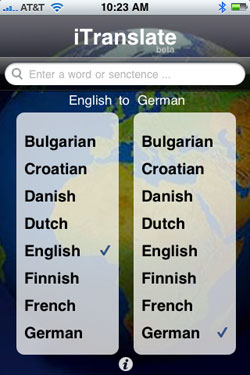
The iTranslate Interface In Action.

iTranslate, leveraging the Google Translation API, offers two-way translation between sixteen different languages, including Bulgarian, Croatian, Danish, Dutch, English, Finnish, French, German, Italian, Norweigian, Polish, Portuguese, Romanian, Russian, Spanish and Swedish.

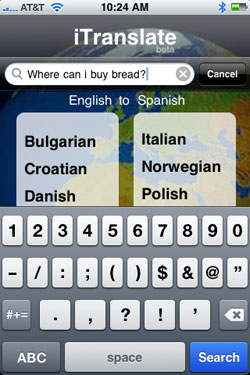
To translate a word or phrase, select the language you want to translate from on the left, and the language you want to translate to on the right. iTranslate will display the current setting, for example saying "English to Spanish", "Spanish to Italian", etc. Then tap the entry field at the top of the app, use iPhone's on-screen keyboard to put in the term, and hit Search. The application also saves your most recent query, as you can see in my example of translating "Where can I buy bread?" into Spanish and Italian.


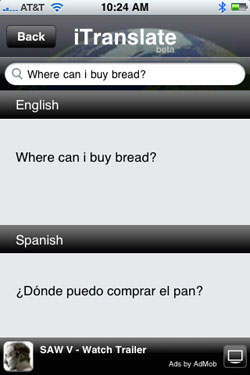
iTranslate Results In Two Different Languages

The results then show the before and after on top of each other in the same screen, helping you to not only find the answer, but possibly learn the phrase yourself. While the application is free, it does leverage AdMob, as many iPhone applications are these days, to help monetize it and deliver some revenue.

To get started with iTranslate yourself, you can download it from the iTunes Store here.

October 20, 2008

October 20, 2008 · 2 MIN READ · BY LOUIS GRAY

Apploop: FINALLY - A Useful iPhone RSS Reader!

Apploop: FINALLY - A Useful iPhone RSS Reader!

By Mona Nomura of Pixel Bits (FriendFeed/Twitter)

FriendFeeders ask time and time again, "Where do you find the things you post?" and "Why don't you ever run out of things to post?" My short answer is "Google", since my methods are quite simple... yet complicated. Discovering this app is the perfect opportunity to elaborate on one of my major resources: RSS.

I am a huge RSS junkie.

I'm all about picture + headline + the first few topic sentences. If all three interest me, I have the option to read the entire article. Most of the stuff I post is pulled from my various feeds. Since my job is computer related, I am always connected to the Internet, my reader is always up, and I'm constantly scanning the headlines. My RSS reader choice is Google Reader, since it gives me everything I am looking for:
  1. Headlines
  2. Thumbnails
  3. Few topic sentences
  4. Option to click
The problem = 98% of the readers do not include the things I'm looking for.

I've been on the hunt for a good RSS reader long before I signed up for FriendFeed. Most RSS readers (especially for mobile phones) are plain text with no visuals. Because I am a huge visual person, I don't even bother looking at my subscriptions via mobile, since a highly visual application didn't exist.

Enter AppLoop.

I randomly stumbled upon this company whilst Googling. I was floored. Not only would this simple application solve my problems while on the go, they are also a content provider. Meaning, if you have a blog / website, with an RSS feed, they will turn your blog into a native application for a phone, for any platform, and submit it to the store for you. For free. Holy wow.

Now the latter doesn't really excite me, since it would be kinda sorta mortifying to see a "Mona application" in the app store. I am ultra excited for this app because I'm hoping my favorite websites will hear about it and choose to offer a mobile RSS option using AppLoop, -- such as LOL cats, Gizmodo, Engadget, or Boing-Boing since again, I'm all about: headlines, thumbnails, few topic sentences, AND the option to click. If all my subscriptions published their content with AppLoop, I'll even go as far as to say: I foresee giving up Google Reader -- even when I'm in front of my computer.

Anyway, the demo video is finally up and they JUST launched. So take a look, the video speaks for itself. :)


iPhone Application Generator Demo from AppLoop on Vimeo

And no, I am in no way affiliated with them, just an excited end-user. ;)
So what's your favorite reader? (mobile or desktop)?

Read more by Mona Nomura at Pixel Bits
Update: For more 'techie views' visit TechCrunch: "AppLoop Transforms Blogs Into Native iPhone Applications" and by ReadWriteWeb: "Make Your Own iPhone/Android Apps With New App Generator" and Duncan Riley's Inquisitor's, "AppLoop iPhone App Generator: High Wow Factor"

October 19, 2008

October 19, 2008 · 5 MIN READ · BY LOUIS GRAY

5 iPhone Apps Your Family Will Enjoy

5 iPhone Apps Your Family Will Enjoy

By Jesse Stay of Stay N' Alive (Twitter/FriendFeed)

As a father of four, gadgets I buy must be something my entire family can enjoy.

When I got an iPhone, I also got my wife an iPhone, and we're seriously considering iPod Touches for the kids this Christmas (Promise not to tell them, okay?).

The iPhone is not only a tool Mom or Dad can enjoy and use to become more productive, but it can serve as an excellent learning and entertainment tool for your children. There are many apps that are great for both young and old, which are essential for a Dad like me. These five applications in the iTunes App store are some of my favorites, which the entire family can enjoy. And only Koi Pond ($.99) isn't free.

iDoodle2 lite

My sons, 6 and 4, love this one. It's simply a basic drawing program, which lets you select colors, pen size, shape, and background color, and create different pictures by drawing on the screen. You select the background color, then you have the option to select if you want to draw freeform with a pen, draw lines, circles, squares, or blobs, and you can doodle all you want. There is also a pay version that offers ability to enter text on your graphic, and have an image as your background that you can draw on. It's great for the kids when you don't have a pen or paper nearby to keep them busy. It's my 4 year old's favorite app.

Pros: Simple idea, hard for kids to get into trouble. The pay version only adds to that experience.

Cons: Not easy enough to use, at least for kids. For kids that can't read, it's hard for them to know to click on "New Doodle" to erase their image and start over.

Crazy Pumpkin


I saw this one enter the App store, and predicted immediately (check my Google Shared items) that this would be top 5, and sure enough, it got up to number 2 before going down again. The idea is simple. It's a Jack O' Lantern. You can change the face of the Jack O' Lantern by sliding the eyes, nose, or mouth over to make different faces. You can also make spooky sounds by shaking the phone or iPod Touch. It's nice and easy, great for younger kids, and catchy enough even adults can have fun with it.

Pros: Extremely simple, great for younger kids and even toddlers (my 6 month old loves my iPhone!).

Cons: I'd love the option of more faces, and maybe a few more sounds, or additional functionality. However, the idea is meant to be very simple.

Koi Pond

This is a classic. I know few iPhone owners that haven't tried this one. Koi pond is simply a pond with Koi fish and lilly pads in it, which you can slide your finger around and make rippling sounds and motions in the water. It's perhaps one of the most relaxing applications on the iPhone - nothing is more relaxing than the sound of rippling water and birds chirping in the background. Better yet, you can shake the phone, and fish food is sprinkled in the pond and the Fish come and eat the food. Be careful though, if you disturb the water, the fish avoid coming near the area you disturbed.

The part I love most about this is that due to the simplicity, it works great for keeping kids busy, especially infants and toddlers who can't read and have limited hand-eye coordination. My 6 month old loves touching the screen and hearing the resulting sounds rewarding him for his actions. He loves looking at it and seeing the cool colors and hearing the sounds that come from the app. I would say this is my 6 month old's favorite App.

Pros: It's so relaxing! It's my new "stress ball". Nice and simple.

Cons: I can't think of any cons to tell you the truth, unless you don't like Fish.

Memory Match by Jirbo

I had a lot of fun with this one. It's a play on the classic, "Memory" game, giving you 30 cards, all turned over, that you must sequentially turn over and see if you can remember where the matched images are. It's a one player game, but something you or your kids can play over and over and challenge each other on the score it gives you. You can also upload your scores to Jirbo.com, and share your score with others using the app.

Pros: Easy to use, fun to play. Who can turn down a game of Memory? Great for kids, young and old, and helps refine their memory skills.

Cons: No 2-player mode, even on the same device. It's single player only. It would be nice to play with someone else like the real card game, or even over WiFi with someone on another device nearby.

FourFree

This is quickly becoming one of my favorites. It's based on the classic, "Connect 4" game, where you and another player can play to see who can be the first to get 4 of your color in a row horizontally, vertical, or diagonal. You can choose to play by yourself against the computer and track your score, or play against another player on the same device.

As a family we usually take a travel version of the real Connect 4 board game with us on road trips to keep the kids busy. Now we can simply bring our iPhones, and our kids can have multiple options given to them, with no lost pieces, and no mess!

Pros: A classic favorite! Gives easy, normal, and hard levels for all ages. Fun for the child and adult.

Cons: I'd love to be able to play with other nearby phones instead of having to pass the phone back and forth. It may be a little too hard for age 4 and under.


Know any other family-friendly iPhone apps that the kids can enjoy? We're always looking for more. Leave your suggestions in the comments.
Read more by Jesse Stay at Stay N' Alive.