Silicon Valley Technology Commentary & Archives · Est. 2006 3,045 Posts · 2006–2026

May 30, 2011

May 30, 2011 · 2 MIN READ · BY LOUIS GRAY

Quora Makes It Harder to Hurt People's Feelings

Quora Makes It Harder to Hurt People's Feelings

While Wikipedia is well-known for its edict against self-aggrandizement and editing one's own biography, question and answer collective Quora looks to be going quite a bit in the other direction, not just permitting people to manage their own reputation on the site, but to outright push for deletion of topics or questions they don't like. In a new policy issued late last week, the service says not only do they want people under discussion to automatically gain moderation of such topics, but any question that is "hurtful or mean-spirited" simply isn't allowed. So no more questions about why specific people are such jerks, you mean Quora-ites.

The policy outlines that it is intended to protect individuals fairly and equally, regardless of their public stature, so Mark Zuckerberg and Ron Conway have equal access as John Smith. Don't know John Smith? Well, he has as much a chance to defend himself on rude comments on the site directed his way as the next guy.

So why is Quora making this move? Is it to whitewash the site of any negativity? They don't seem to believe so, but they do recognize that some high profile users will use the increased ability to moderate, to "remove questions that other users would be interested in learning about," as Marc Bodnick adds, "We believe that this risk is worth taking in return for the benefits we achieve..." in line with the company's mission to create the "best database of human knowledge on the Internet."

While running from the world of libel and slander is laudable, one has to assume that negativity exists in both the real and virtual world, and it's possible that negative feedback related to individuals could be valuable, especially as the word "best" is so subjective. But their goal is to keep the content on the site relevant and valuable.

Oddly, despite focusing on equal protection under the rules, the change is clearly targeting the famous and semi-famous alike, closing with a hope that "Quora will remain a site where there is not much gossip about the personal lives of well-known individuals," as Bodnick adds, "Internet users have many other alternatives for this kind of content."

The move follows another controversial move earlier this month, when the site disavowed its initial position against self-promotion.

May 28, 2011

May 28, 2011 · 2 MIN READ · BY LOUIS GRAY

Youtify Turns YouTube Into Your Music Video Jukebox

Youtify Turns YouTube Into Your Music Video Jukebox

YouTube is much more than a repository for amateur videos and bloopers. The video giant is the second largest search engine for the Web, a practically endless treasure trove for TV clips of all types, and unsurprisingly, heaven for music video promoters and fans. A cool site called Youtify (YouTube + Spotify, get it?) launched this month to tap this resource, letting you build your own playlists, search for your own music, and pretty much make the Web your jukebox. Even if you don't want to watch the videos, the music alone is great.

Available both as a stand-alone Web app (at www.youtify.com) as well as a Chrome browser app, Youtify transforms your Web browser into something looking much like the iTunes music player, prepopulated with two playlists: "Top 100", showing the usual popular fare from artists like Beyoncé, Katy Perry and Lady Gaga, and "Best of YouTube", which highlights fan-submitted music (like Super Mario beatbox and ukulele the beatles - obladi oblada).

Searching Youtify for Underworld Turns Up Scads of Videos

Every link plays the music video in the bottom left corner of your browser (like iTunes does in its music player) and has the option to expand to your full screen. You can also right-click and go to the YouTube video directly.

The Top 100 Youtify Videos Are Names You Would Recognize

While that's fun, what's even better is when you search for your favorite music. Even a techno geek like me could pick up hundreds of tracks (well, music videos) from bands like Chemical Brothers, Underworld and Daft Punk. If a band has ever made a music video worth playing, it's on YouTube. You can create and save playlists, and search playlists across the network. The great part of that is instead of recreating the playlists for each artist, it's possible they already exist somewhere. Searching an artist name can turn up dozens of playlists, each with dozens of videos already there.

Building and Playing a Youtify Playlist

With MTV getting way the heck away from its initial mission, YouTube has taken over as the premiere venue for music videos on the Web, and possibly, all media. Youtify makes finding those videos and the music behind them fun. While it's not going to replace your music library app (be it Spotify, iTunes, Google Music or something else), you'll definitely want to check this out. Just don't plan on being extremely efficient at the office while doing so. Find it at http://www.youtify.com.

May 27, 2011

May 27, 2011 · 1 MIN READ · BY LOUIS GRAY

How to Scrobble Your Google Music Plays to Last.fm

How to Scrobble Your Google Music Plays to Last.fm

Google Music is very much a beta product, but one that is going to get a lot of attention as it becomes more widely available, competing in the online music world with Apple's forthcoming cloud music player, Amazon's cloud player, and Spotify, which thus far has focused on desktop or mobile applications to play on-demand tunes.

After taking a few days to upload my music to the cloud, I'm enjoying getting access to my tunes on any computer I want, from practically anywhere. But the service doesn't do a few things that are practically a must for me - first, update Last.fm with my listening history, and second, play to my Sonos S5 setup at home, leaving me to listen through my laptop or phone's speakers.

Last.fm integrated into my Google Music Player

After politely venting about these product holes on Twitter this morning, the first of these two holes was solved. Daniel Slaughter, a Web Developer at Grand Valley State University in Michigan alerted me to a project of his that brings Last.fm scrobbling to Google Music, letting the OCD side of me enjoy the music again, while keeping my statistics up to date.

Google Music Player updating Last.fm

His project, simply titled Google Music With Last.fm, is a script that runs on FireFox 3 or 4 with Greasemonkey installed, or of course, Google Chrome. To get it running, I downloaded and ran the script, and a new Last.fm section showed up in my Google Music. Once I had authenticated the application to update my personal Last.fm account, the song plays and history started to rack up.

If you're one of the early folks to gain access to Google Music Beta, and you miss the Last.fm integration that practically every other music player (including Spotify and iTunes) offers, you'll want to get this script going. Very easy to add and very clear to see the benefit. Nice work, Daniel.
May 27, 2011 · 1 MIN READ · BY LOUIS GRAY

Bre.ad Rises in June, Adding Billboards to Social Sharing

Bre.ad Rises in June, Adding Billboards to Social Sharing

Everybody and their mom has a URL shortener these days. With 140 characters being the new 1,000 words, shrinkage is no longer a bad thing. But not all URL shorteners are the same. Bre.ad, which promises it will be opening to the public in June of this year, gives its users an option to deliver a customized digital billboard attached to every share, be it for a favorite brand, cause, charity or anything else. Have something to promote as well as something to share? Bre.ad hopes you'll join their bakery.

Bre.ad enables you to share to three places - their own site, aggregating all shares within the network, ordered by chronology, as well as the standbys, Facebook and Twitter.

I Make a Toast to Charity Water

Before you share on Bre.ad, you first select an interest, brand or charity that you want to promote to your friends and make "a toast" explaining why you selected that cause. Having selected this promo, then you're ready to bake some bre.ad links.

Sharing My Link to Bre.ad

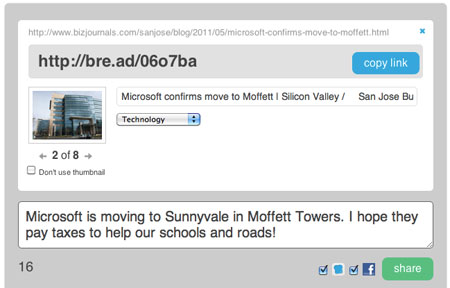
From that point, sharing links is pretty similar to other shorteners, like bit.ly, goo.gl and the rest. Copy the original link, enter accompanying text, and you're on your way. But Bre.ad also lets you pick a thumbnail for the share and a category, helping the bre.ad network know how your link should be categorized.

The resulting Tweet and Link. 

When friends bump into your bre.ad links on Twitter or other services, before they reach your link, they see your promo, which can last five seconds. For me, I picked Charity: Water, the fast-growing and incredibly interesting charity that's bringing clean drinking water to places that need it. For you, you might pick Apple, Nike, Lady Gaga or whatever you find interesting.

Think your connections won't mind a small ad before your content? That's what Bre.ad is betting on. You can sign up for their beta now. Doors are opening soon.