Silicon Valley Technology Commentary & Archives · Est. 2006 3,045 Posts · 2006–2026

August 13, 2010

August 13, 2010 · 2 MIN READ · BY LOUIS GRAY

48ers.com Offers Realtime Social Search Across Networks

48ers.com Offers Realtime Social Search Across Networks

For the most part, realtime search engines, including OneRiot, Topsy and Twazzup, have focused on indexing the world of Twitter. That makes some sense, given the significant number of updates flowing through the microblogging network, but it covers only part of the worlds real-time sharing spectrum. A relatively new site, called 48ers, is looking to return results not just from Twitter, but also Facebook, Google Buzz, Digg and Delicious, and more interestingly, it lets you show results from each network on its own, should you choose. While Twitter may still win in terms of the total number of discovered results, they are intertwined with people who have chosen to post in other places.

Much like practically every search engine that has debuted after Google's spartan interface displayed the UI of the future, 48ers.com's home page is relatively light, showing only a search field, and in the age of Twitter, Trending topics. Click on a Trending Topic, such as "Hannah Montana Forever" and you see results that match the query.

A 48ers.com Search for VC Funds Shows Results from Buzz, Twitter

No big deal, right? True. But if you look at the top left of the search result page, you see you can now filter the search by any of five networks. Click on Facebook for the same query, and you will see shares on Facebook with the same match. Similarly, clicking on Google Buzz, Digg or Delicious will further segment the results by their source.

Searching 48ers for Oakland A's Updates from Buzz

Clicking on the results of any query takes you to the status update, if on Twitter or Facebook, the Digg submission, the Delicious bookmark, or the Google Buzz entry. (For example, this special Google Buzz entry on Hannah Montana)

Breaking News updates via 48ers from Facebook and Twitter

Like Twitter's vanilla search engine, 48ers offers useful searches, including "breaking news" and the more social ""totally recommend", which gets used surprisingly often.

Where 48ers comes up short is in continuing the realtime flow. Twitter's search engine, despite its failings, prompts to refresh as new entries are posted. FriendFeed's has them flow from the top. 48ers does not do that, so while the initial query may be made on realtime sources, the results themselves are static.

You can find 48ers on the Web at http://www.48ers.com or on Twitter at @48ersdotcom.

August 11, 2010

August 11, 2010 · 3 MIN READ · BY LOUIS GRAY

TweetDeck Looms to Battle Seesmic, Twitter on Android

TweetDeck Looms to Battle Seesmic, Twitter on Android


In the two years since TweetDeck first launched on the desktop, it has set the standard for multi-functional multi-account Twitter-centric applications, bringing the concept of columns, grouping and integrated search to what had previously been a bland market of simple apps. With the product's success, we saw the metamorphosis of Seesmic from a video comments company to one that has gone head to head with TweetDeck on practically every screen, even as the two saw focused effort from Loren Brichter on Tweetie pass them by and become the official Twitter application from the microblogging mothership for both the Mac desktop and the iPhone.


Now, the two are competing for visibility on yet another screen - that of the fast-growing Android platform, and unlike previous battles, which usually saw TweetDeck innovating first, it was Seesmic who got there first - in a big way, going live on Android and BlackBerry back in November of 2009. Tomorrow, TweetDeck will officially launch the first iteration of its Android product on the Android Marketplace, and those who prefer it will once again have that choice.


The Accounts Pages for TweetDeck and Seesmic for Android


As Twitter quite visibly has filled holes in its lineup with the addition of Tweetie, both TweetDeck and Seesmic have positioned themselves as the more robust alternatives, providing support for not just Twitter streams, but also Facebook, Google Buzz, LinkedIn and Foursquare, depending on the platform. Seesmic's Android app, so far, in the absence of an offering from TweetDeck, has been my choice, thanks to its integrated multi-account and multi-service support - something Twitter's native app simply won't do.


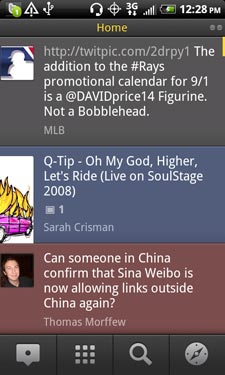
TweetDeck Updates Put Multiple Sources In One Stream


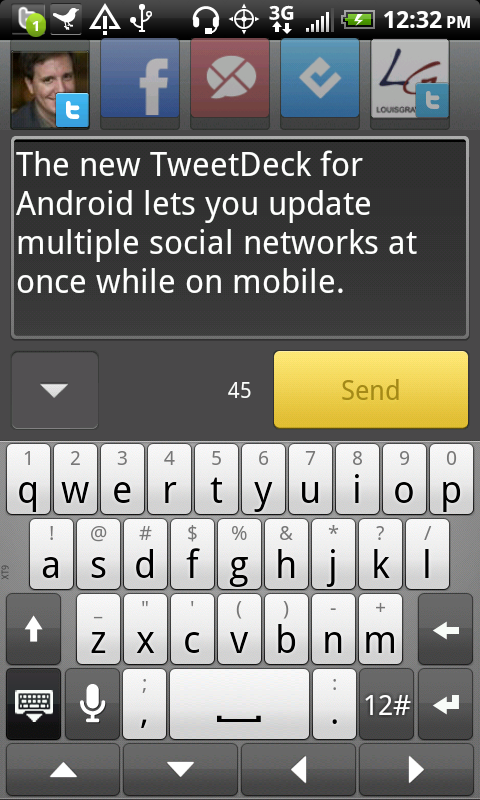
Now, for Android, both applications will allow you to view streams from multiple sources, and update multiple accounts simultaneously. But where TweetDeck and Seesmic differ is that Seesmic's activity is very hierarchical. You view one of your accounts at a time, and go back to the top level to see other accounts, while TweetDeck is looking to "mix" the streams with updates from all different sources in a single column.


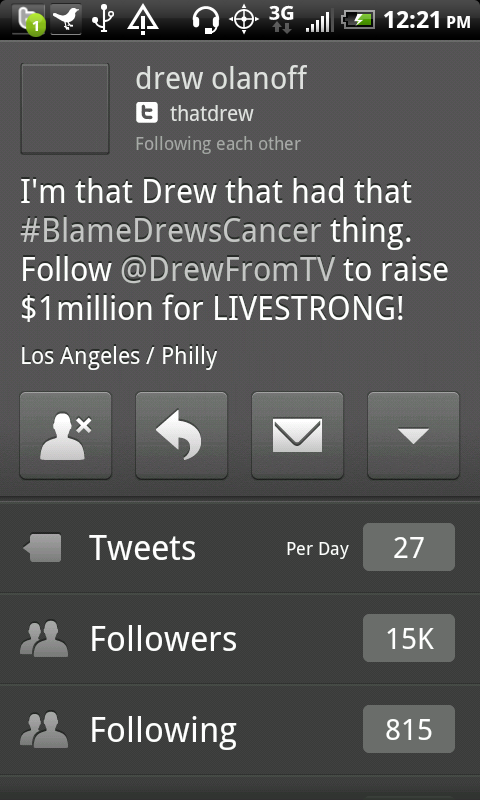
Updating from TweetDeck Android and Browsing a Profile


Updates display in TweetDeck in different colors depending on their source. Gray updates are from Twitter, Red are from Google Buzz, Blue are from Facebook, and Aqua updates are from Foursquare. Now, you can see all these in one place. Also true to TweetDeck's background is the option for you to swipe right or left and see more specific "columns", including a new one called "Me", which captures mentions for you across multiple networks, including Facebook comments and likes, as well as Buzz updates on your content.

A New "Me" Column in TweetDeck for Android

For somebody who needs that mixing of updates across networks on a single mobile screen, TweetDeck will be the best option. But the early version, which I have been using all day, definitely feels brand new, while Seesmic's offering is more stable and feels easier to use - no doubt the product of having been publicly available on Android for more than 8 months. TweetDeck's Android launch has been much-awaited, and its integration of a column for "Me" is interesting. The product also offers deeper integration with Foursquare, tapping into venue details for check-ins.

For TweetDeck addicts, the introduction does not come too soon, even if Seesmic, today, is a stronger offering. This should be a fun space to keep an eye on over the next several months.
August 11, 2010 · 3 MIN READ · BY LOUIS GRAY

Google Reader Shows If You Are a Skimmer or a Clicker

Google Reader Shows If You Are a Skimmer or a Clicker

With most RSS feeds providing the entire contents of a blog post, for many people, the RSS reader is not just the place where news is discovered, but also where it is consumed. This means that if one's RSS subscribers triple, downstream traffic may not increase at a similar rate, as even if readers enjoy one's content, it is likely that many don't click through to the original story. On Tuesday, Google Reader introduced a metric that shows how often you are clicking on feeds within the service, and for somebody like me, who uses the service to read and share downstream, it's no surprise I only log a few clicks a day - with many of the sites I click to being different than the most active sources.

As a power consumer and human filter for what I portray as quality content, I recognize the numbers I am dealing with in Reader are large. In the last 30 days, I read more than 22,000 items from just over 850 disparate sources. Of those, Reader says I shared about 11 to 12 a day (down from my previous pace), but that I only clicked through 112 times in total, just under 4 clicks a day, or a click rate of just over one half of one percent. That means for every 200 stories that flow into my Reader, I click through once, and share three, picking the best 1 to 2 percent of the tech Web.

My Monthly Stats Show I Share More than I Click

Google Reader's latest addition to its array of statistics is found in the Trends section of the service, and given the array of options that you have to interact with the feeds, you can now see your 30 day trends for Reading, Starring, Sharing, E-mailing, Mobile Access, and finally, total clicks.

I Click On Gizmodo and Daring Fireball More Than Other Sites

The Most Frequently Updated Sites Don't Dominate My Clicks

So what drives a click, rather than reading within the site? For me, it can be as simple as a truncated feed that forces one to click and find the full story. In other instances, the article may be interesting enough to comment on immediately, or there may be rich media, such as embedded videos, that just don't work perfectly in Reader. When I go to Reader, my goal is to read all items in the service, and venturing out of the site to a specific story simply gets in the way, often. When I do open up a story, I do so in a new tab, so I can finish the task of getting my unread count to zero, and then marching left to right through the individual stories that have action.

Reader's data shows I am a skimmer. I have to be a skimmer who analyzes fast and acts fast to choose the next step for each new piece of content. Others may show much different percentages - and I bet even if I spend less time staring at a Twitter stream than I do on Reader, I do more clicking in Twitter URLs, given they don't ever include the full text. So I wouldn't chalk up my numbers as saying that RSS decreases engagement, but it does show it's likely a massive majority of readers are the strong silent type who read within Google Reader and don't go to the downstream blog.

Find your stats here: http://www.google.com/reader/view/#trends-page.
You can find my shares here: http://www.google.com/reader/shared/louisgray

August 10, 2010

August 10, 2010 · 2 MIN READ · BY LOUIS GRAY

Google Revamps and Simplifies Contacts In Gmail

Google Revamps and Simplifies Contacts In Gmail

Gmail's introduction in 2004 changed the way people interact with Web-based mail, moving us away from needing to carefully prune old messages to save space, and introducing a conversation-oriented interface, with new label-based hierarchies, away from the desktop metaphor of folders. But while Gmail's innovation has been clear, Google's approach to Contacts has lagged, making it the target of frustration from many users. Today, the company admits as much, saying it's the thing people "are least satisfied with" about Gmail. They hope a number of improvements, rolling out immediately, will help.

The goal of the many changes introduced to Google Contacts today is to make using Contacts as intuitive as Gmail, bringing keyboard shortcuts, automatic saving, and the ability to undo edits you may have made in error. This way, if you already are a Gmail power user, you will be a Contacts power user as well.

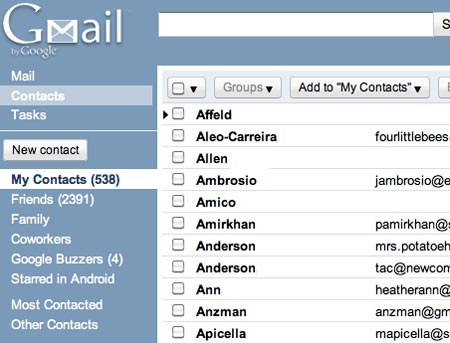
Sorting by Last Name in Contacts

In addition to the "Gmail-ization" of Contacts, the company added the option to sort by Last Name, the ability to add custom labels for phone numbers or other items, structured name fields, for titles and other details, and a more prominent notes field, so you can say just why somebody is in your address book in the first place. Also, with the upgrade, Contacts and Tasks also occupy a more prominent position in Gmail than before, sliding up the left sidebar to the top, just underneath the Gmail logo.

Editing A Contact in GMail

You Can Undo Changes In Contacts

The new Contacts view makes it easy to get all of a person's details from one place, and make edits. You can easily add job titles and family relationships, or "view recent conversations" to see the last time you traded e-mail or chats with the person. This, thanks to the tie in with Google Buzz, also surfaces Buzz posts that match the search criteria.

Merging Duplicates In Gmail

Also, for power users, you can now merge contacts from the "More Actions" menu, if you have made duplicates, or you can choose to "Find and merge duplicates", handy for the many of us who have made imports only to find friends' records multiplying. I myself merged 75 duplicate records, so I don't have names repeating ad nauseam when I go looking for numbers in my Android phone - closely tied to Contacts.

As somebody who was more closely tied to the Apple Mail and Address Book infrastructure, Google Contacts hadn't always taken a front seat in how I manage people and relationships. Moving to Android, adopting GMail more strongly, and seeing the rise of Buzz as a platform has made getting this right increasingly important. Today's moves will make it seem more natural and fluid - as Apple used to always get right, but for the Web, not the desktop.