Silicon Valley Technology Commentary & Archives · Est. 2006 3,045 Posts · 2006–2026
Showing posts with label widgets (4 posts). Show all posts

September 30, 2009

September 30, 2009 · 2 MIN READ · BY LOUIS GRAY

Google Translate Widget Takes Sites and Blogs Global

Google Translate Widget Takes Sites and Blogs Global

According to my Google Analytics statistics, about 25 percent or more of the visitors to my blog over the last 30 days prefer a language other than English. Given I tend to use more words than pictures, it would be assumed readers would either be multilingual, or that they would take the URL and throw it into a translation service - be it Google Translator or Babel Fish. But today, Google made it even easier for site owners to bring their data to readers in the language of their choice, with the introduction of a new translation widget that, on the fly, without requiring visitors to install anything, displays the content in their preferred tongue.
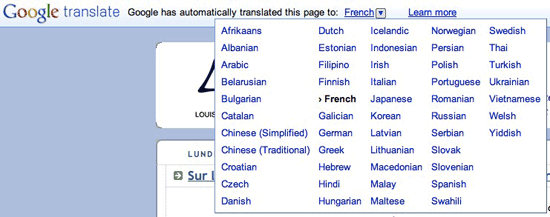

The New Google Translate Widget In Action

In February, I wrote a post that encouraged people to participate with those discussing your content around the Web in the language of their choice. (See: Don't Speak the Language? You Can Still Participate.) I firmly believe a core tenet of being active in distributed conversations is to have the conversation with the person where they want to. If you can take that up a notch and have that conversation in their native language, then you win. While some may hem and haw about the accuracy of Google Translate, I recognize it's not perfect, but it's very good and improving. Why not make the best effort and get close rather than shying away.


My Blog Following One Pass by Google Translate


The Same Post, This Time In French

To get started as a content owner, just go to Google's Translate gadget, grab the code, and put it anywhere on the page you believe makes sense. Now, if visitors want to see your content in Swahili or Catalan or any of the approximately 50 languages supported, all they need to do is choose the language from the pull-down menu, and it happens on the fly.

It's all part of bringing more of the world's information to more people, while removing barriers. You can see this gadget on the upper right of this blog on every page, and I hope to see it on many pages going forward.

September 25, 2009

September 25, 2009 · 2 MIN READ · BY LOUIS GRAY

Apple's Dashboard Widgets Comatose As iTunes App Store Skyrockets

Apple's Dashboard Widgets Comatose As iTunes App Store Skyrockets

Prior to the debut of Apple's iPhone, software developers wanting to make miniature applications to reach Macintosh users had a direct route to customer's desktops through the development of Mac OS X Dashboard widgets. Billed as major functionality debuting in Mac OS X 10.4 (Tiger) in early 2005, Dashboard, much like Konfabulator before it, featured widgets including weather forecasts, stock updates, calculators or simple utilities, like a dictionary or thesaurus. Over time, developers managed to make a number of creative uses for these apps, from delivery updates to flights' status, or even lightweight arcade games.

But four years later, Dashboard is dormant, while not yet completely dead. A quick calculation of the total number of widgets listed on Apple's Web site is just over 4,500, of which 820 are international. In remarkable contrast, Apple's iTunes Store loudly proclaims its haul to be more than 75,000, of which a massive 1,394 were posted just last Friday.

Want to know how many new Dashboard Widgets were posted last Friday?

Zero.

Interestingly, Apple's Dashboard Widgets site highlights the last 50 "Just Added" to the Web site, and for whatever reason, between September 9th and September 21st, no Dashboard Widgets were posted. Maybe the one guy whose job it is to get them approved was on a two-week vacation?

And in the week, starting with Monday, only 39 total Widgets made it into into the directory, including fascinating titles such as the "Iowa Hawkeyes Football Schedule" widget or the "Countdown to Thanksgiving" widget.

With iPhone app developers having a fast-growing audience of millions ready to spend real money on applications for their mobile phone, the idea of creating a miniature application for the desktop, for free, probably doesn't have much pull. It's no secret that the iTunes App Store's runaway success has played a big role in making any discussion about Dashboard completely unnecessary.


The louisgray.com Widget as posted in 2007

Just a few years ago, many thought widgets were going to be the next hot thing in desktop apps. Konfabulator was purchased by Yahoo! and turned into Yahoo! Widgets, which claims nearly 6,000 desktop widgets. And way back in 2006, I even made a dashboard widget for louisgray.com, which I later updated in 2007 and still works. But the talk of widgets faded, as people primarily chose to use the Web browser and their iPhones as the conduits for Web data, preferring not to have a gazillion little widgets floating about their screens.

Considering the dramatic drop-off in buzz around Dashboard widgets, and a corresponding meteoric rise in iPhone deployments and penetration, it's no surprise to me that you see this gulf, which now measures almost 20x in favor of iTunes applications. It's enough to wonder if Apple will ever bring up the Dashboard again, except maybe to provide a place where iTunes applications purchased for the iPhone today can sometime live. They won't kill it outright, but it sure looks like a dinosaur, after only four years.

February 4, 2009

February 4, 2009 · 2 MIN READ · BY LOUIS GRAY

Pluck On Demand Supplies Contextually Relevant Content Widgets

Pluck On Demand Supplies Contextually Relevant Content Widgets

By Eric Berlin of Online Media Cultist (FriendFeed/Twitter)

Most Web site publishers and bloggers are always looking for ways to add value for their readers. And smart online publishers look to add value while also marketing themselves to a larger potential audience.

Enter Pluck on Demand, "a new self-serve product that adds contextually relevant content and social media to your site, increasing pageviews and user engagement while earning you incremental revenue."


Add content and social media to any Web site
-- powered by Pluck On Demand

In other words, Pluck on Demand is a widget that you install on a Web page that drives contextually relevant content to your site, buffing out your site's content offerings and, in theory, also making your site more visible to search engine spiders, the almighty Google in particular. And the proverbial cherry on the top is sharing in the revenue made possible by increased page views.

Here's an interview with Eric Newman, Pluck's SVP & General Manager, who explains Pluck on Demand a little bit further.


(via Allen Weiner)

It is interesting to note that Pluck pulls content from the Blogburst network to serve to their widgets. And I also learned that Pluck was purchased by Demand Media. Thus, the name Pluck on Demand has more than one meaning, it seems!

I like the idea of Pluck on Demand, but from the publisher perspective the first obvious questions have to do with whether or not the widget is really worth adding, is it just more widget bloat, does it truly help with increased search engine visibility, is the content truly relevant and useful in terms of what the Web site already offers, and so on.

Bill Sweetman of One Degree is impressed, at the least, writing that he has "been piloting this service on one of my sites and have already seen a 10% increase in traffic that I can directly attribute to Pluck On Demand. And that's without taking advantage of any of the social media widgets!"

I look forward to installing Pluck on Demand sometime down the road on Online Media Cultist to see the results for myself.

Read more by Eric Berlin at Online Media Cultist

January 25, 2009

January 25, 2009 · 3 MIN READ · BY LOUIS GRAY

Socialtwist's Widget Puts New Twist On Social Content Sharing

Socialtwist's Widget Puts New Twist On Social Content Sharing

By Eric Berlin of Online Media Cultist (FriendFeed/Twitter)

When reading a blog post, it's not uncommon that you will see a "Share This!" button at the bottom that you allows you to do such things as share it with friends or to publish it on your own blog or social media profile. A new Tell-a-Friend widget, produced by SocialTwist, aims to expand on that idea by enabling distribution to such communications platforms as instant messaging services and by allowing easy selection of contacts through e-mail and social networking address books. Here's how they describe it:
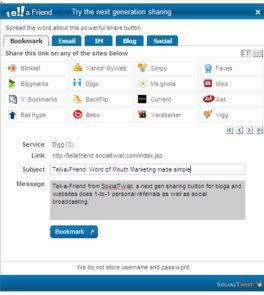
Unlike other sharing utilities, Tell-a-Friend stands unique to give you a single button which enables both one-to-one personal recommendations and social broadcasting. Tell-a-Friend is the only sharing widget to support Instant Messengers (chat) and personal messages to friends on social networks. That's clearly the best of word of mouth marketing rolled in one.
The idea is that the widget is easily installable, highly customizable, supports more than 80 services, and comes packed with analytics so that you can monitor your "viral campaigns." With support for all major instant messenger services and social media services spanning from Bebo to Yardbarker, it's hard to think of a place that you can't use Tell-a-Friend to send to. And the fact that Tell-a-Friend displays as a pop-up within the Web page that you're visiting makes for a seamless and easy user experience. I also really like the tabbed interface that allows you to easily select that type of service you'd like to use to distribute the content.


It's a pretty cool and timely service as it builds upon already available services and aims to please publishers who are always eager to enable the distribution of their content. And the ability to track the metrics of that distribution is potentially important in quantifying the ever elusive notion of "influence."

So if everything about the Tell-a-Friend widget makes sense and is looking good, I think the challenge will be to make it as easy as possible for publishers to understand and install. The Web site showcases a really cute and well produced explainer video:


But I was left wondering, "Where's the Tell-a-Friend widget?" I realized that I didn't know what it looked like! To be fair, a sample version of it is sitting in the middle of the homepage, but it took me some time to track it down.


And so if that leaves room for argument that I'm slow on the uptake, keep that in mind while I explain that I had some trouble getting the widget installed and running. I began by trying to install Tell-a-Friend on a Blogger site, figuring that would be the easiest way to test it out.

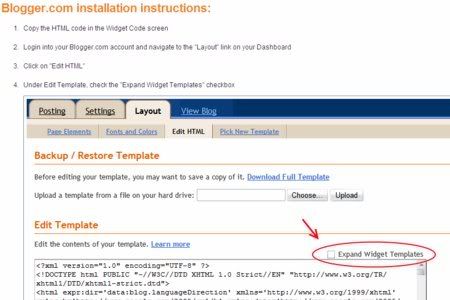
However, I couldn't get the widget to publish. I followed the step-by-step instructions that were provided, but could not get the widget to appear.


Even though there were several screenshots given to help me, there was no final screenshot showing the widget displayed on a "live website" so that publishers can see what the widget is supposed to look like on a published webpage. Translated, I did not see any written or visual instruction that tips the audience off that Tell-a-Friend is supposed to appear directly beneath the bottom of each article.

After trying to "hack" the Blogger template in a few different ways, I gave up and moved onto a WordPress site. That one proved to be successful, though it does take a little bit of technical knowhow to get it running: You have to download a .zip file with the widget code, FTP it to your WordPress plug-ins folder, and then go into your WP management tools to activate it.

Overall, I believe that there's a market for widgets that are truly useful to both publishers and Web site visitors, and Tell-a-Friend is certainly a part of that conversation.

Read more by Eric Berlin at Online Media Cultist