Let's talk about the
Camp Fire for a second. My family moved to
Paradise in 1991, as I was starting 8th grade. I lived there through high school, until heading to college. The family stayed until all kids had graduated high school - the last in 2004.

This was us at home in '91.
While news has referred to Paradise as isolated, we actually were moving from an even smaller town. I'd spent elementary school in
Brownsville in Yuba County. When my dad got a new medical practice in Paradise, we were blown away by the McDonald's and "all those power lines".
The route from my elementary school home to Paradise.
I only spent one year in the Paradise school district, before my mom got a job teaching at
Chico Jr. High. Through high school, I spent every early morning at church in seminary, and then driving down the Skyway to
Pleasant Valley High School.

(Here's us in front of our house)
Paradise was always a retirement community. My dad's work was primarily elder care - geriatrics. Sometimes they died. More than once, I accompanied my dad to the coroner's office while on rounds. As he said, either their heart stopped, or they stopped breathing. Circle of life.
But that didn't mean death by other means was impossible. Fire was by far the top concern for the community. Paradise is located on a ridge in the foothills, placed squarely between two canyons. When fire would light, it would often head for the city.
In 1992, my sophomore year of high school, we evacuated twice.
See the @ChicoER's coverage of those fires. Notice one of those started -- you guessed it -- at the Skyway. The problem with this, of course, is that was the main road out of town.
Fires have always been common in Paradise. We evacuated in 1992.
In 1992, even as we had yet to unpack from evacuating the first time, ash started to fall on our driveway and house. Thick, black smoke loomed above us, and the fire was closer than ever. Some firebug, in copycat mode, had lit a blaze near city limits. We left again.
Luckily, as with every other time, the fire crews did an amazing job stopping the flames from getting deep into town. We marveled at the burn scars that approached neighbors' property, but didn't take any homes or casualties.
Some have argued Paradise is a woodsy town that had no business building where it did. But it's not all the thick forest you may have in your mind.

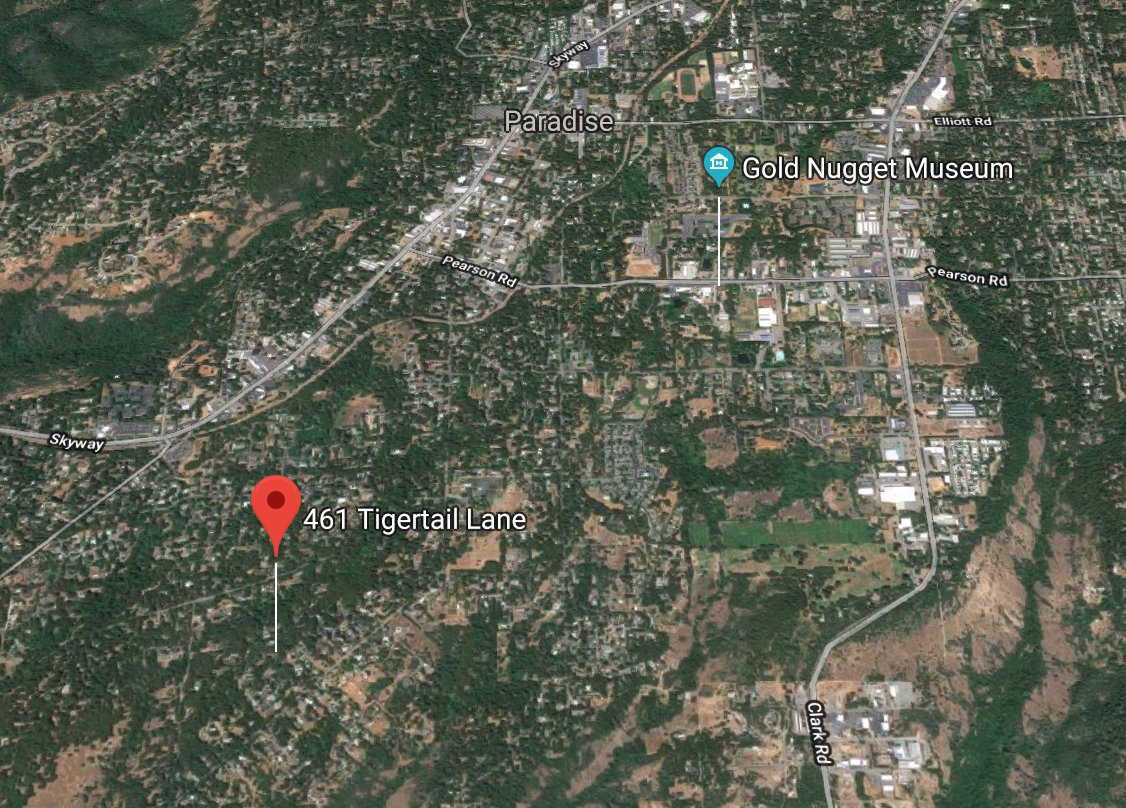
This is the entrance to Tiger Tail Lane from Foster Road (via Google Street View).
Long after I left to college and embedded in Silicon Valley, there have been other fires. As with those in the early 1990s, most were stopped. And as @Weather_West and others have reported, there were many plans in place to protect residents if worst-case happened.
Our home's position in a terrain map, clearly in the fire zone.
So what made the Camp Fire different? How did the above map turn into this scar on the North state? In addition to the exceptionally low humidity and the high winds (which can't be discounted), I'd say the origin of the fire played a huge part.
The fire's position (and all the closed roads), as of this week.
Previous fires, which started by Skyway or the canyons, and slowly meandered their way to the city, gave residents and firefighters warning. People had time to pack and leave, and routes were not frantic. The Camp Fire was a sneak attack with brutal force.
The Camp Fire didn't start on the lower Paradise side. It started in Pulga, an even tinier community. It started in the more woodsy side, where topology made it nearly impossible to stop, in starved fuel-laden forests, powered by ferocious winds and drought.
Instead of starting at the bottom of the above photo, it started at the top and right.
The winds pushed the fire into the main part of town, to all the people and all the businesses, and it hasn't stopped. Adventist Health Hospital, where my dad worked, was among the first to go.
When
@Weather_West shared a tweet from @Gloria2marie, showing fire South and West of Paradise, I immediately realized the town was gone. In a Slack message to a friend, I wrote:
"This means, if true, it's going to F--- up the whole town. Bye."
Classy, I know. But not wrong.
The casualty totals, surpassing all records in California, have not been a surprise. Knowing the aging, slow, immobile population, many who don't drive, and the speed of this fire, we're lucky thousands did not perish. But the loss is still stunning.
That an entire town can be zapped off a map is practically unprecedented. And for those who want to go back... to what exactly? No infrastructure. No power. No water. No cell service. And possibly human remains waiting for you.
Chico, where I went to high school, has for the most part escaped the direct flames. But
now the refugees from Paradise are encamped at the town Walmart, a drier, more outdoor version of the Lousiana Superdome during Katrina. Thousands have nowhere to go.
More than 52,000 people have been evacuated since the Camp Fire erupted in Paradise on Thursday, packing parking lots, shelters and hotels across Northern California, and straining the housing stock.
There are still hundreds missing. So many are unaccounted for that law enforcement is releasing names in batches to avoid overload. Imagine that. The fire was so intense, many people may never be found -- incinerated and returned to the dust.
The Camp Fire is not just another news story or a set of headlines, or an unfortunate reason the Bay Area is smoky. It's a remarkable human and modern disaster.
This was our Christmas photo our first December in our Paradise home.
It's almost certainly gone now, but we're alive.
I've read some ridiculous tin foil hat conspiracies on Twitter that you wouldn't believe about how the Camp Fire started. You could say this type of fire was inevitable, but also preventable. Of course climate change played a role. Of course the town makeup played a role.
Either way, this is a conversation we are going to keep having in California, and throughout the Western US and beyond. Is Lake Tahoe safe? Is Sunnyvale? Last year Napa found out the hard way. My grandparents' home in Redding was threatened in the Carr Fire.
It's reality.
This isn't a "feel sorry for us" thread. It's been a while, and my whole family is safe. But they are active in connecting with those who stayed.
The woman who prayed her way to safety in a firey ride you may have seen on @Gizmodo was a high school friend I've heard pray before.
This was the last photo I took in Paradise, in May 2015, when I took my boys to a party for my brother's child - their cousin. The home that looks like it was under construction a few short years ago... it's gone now, to dust and ash.
As you lament the bad air and see the numbers rise ever upward, I hope this helps remove the abstract from what seems like a tiny town far away. Like the Woolsey Fire and the Carr Fire and all the others, your home could be the next hashtag. Have a plan.





 Technology marches on with benefits, and drawbacks too. [Graphic via